cragger312
New member
I don't think this is an issue with the game, but rather a problem on your end. I have old first edition 2060 which never even had its thermal paste replaced and it never bottlenecks (in a manner of speaking, obviously, but not in a sense of causing problems). Game runs on more or less 120-150fps at all times, no stutters, no lag. Didn't have any "leaks" either.
poisonfree97 your PC parts seem fine (other than the cpu perhaps), so you should not have this issue at all. I have a couple ideas you can try.
0. Obviously the first thing you should check is if you have some random outdated mods, and if so, throw them to the void. Also check if you have some unwanted start options in steam, like "-vulcan" for example. I recommend leaving all that blank.
1. Set lowest/medium settings, turn on dlss, close the game and clean your shader cache (best if you just delete all of it). Restart the game and test. If the issue persists, try windowed mode, if that doesn't change nothing, install the game on other drive, preferably fast one.
2. If that doesn't cut it, then I suspect your OS is doing this. If I were you I'd reinstall windows and test it again. It doesn't hurt to do that every now and then anyways, so troubleshooting is as good opportunity as any.
Other people in this thread though seem to have way outdated cpu/ram, so I doubt the stutters they report are even connected to any sort of gpu problem, most likely just cpu bottleneck, or extensive use of pagefile (i bet using space from some old hdd, considering other pc parts). You can't underestimate the impact ram and cpu has on games. I upgraded to 7800x3d and 32gb of ddr5 about 6 months ago, and my fps in cs literaly jumped from unstable ~120 with drops below 60, to solid ~280+ (despite staying on old 2060). Deadlock has way higher requirements than cs, so it is only fair your game runs like shit on cpu like ryzen 3600 and 16 gb of some 2200 mhz CAS 69 ram.
I honestly made the account just to reply to this thread, because you seem to bump it every 10 minutes or so. I recommend you try what I said. I really doubt this is game level issue because there's literally no reports of any issue of such kind other than this thread, and as mentioned, I experience no such problem myself either.
Hope this can be of help. Cheers!
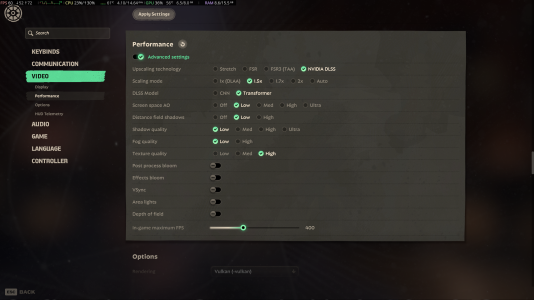
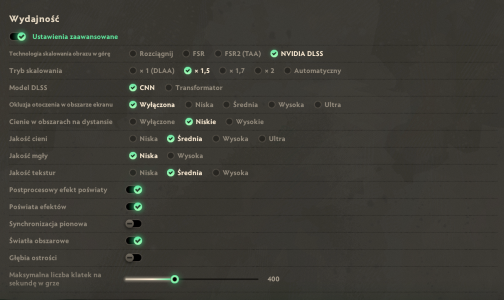
I attached my settings so that you can test using my setup. I believe its very performance friendly. On my end these settings don't stress my gpu beyond like 50%.
poisonfree97 your PC parts seem fine (other than the cpu perhaps), so you should not have this issue at all. I have a couple ideas you can try.
0. Obviously the first thing you should check is if you have some random outdated mods, and if so, throw them to the void. Also check if you have some unwanted start options in steam, like "-vulcan" for example. I recommend leaving all that blank.
1. Set lowest/medium settings, turn on dlss, close the game and clean your shader cache (best if you just delete all of it). Restart the game and test. If the issue persists, try windowed mode, if that doesn't change nothing, install the game on other drive, preferably fast one.
2. If that doesn't cut it, then I suspect your OS is doing this. If I were you I'd reinstall windows and test it again. It doesn't hurt to do that every now and then anyways, so troubleshooting is as good opportunity as any.
Other people in this thread though seem to have way outdated cpu/ram, so I doubt the stutters they report are even connected to any sort of gpu problem, most likely just cpu bottleneck, or extensive use of pagefile (i bet using space from some old hdd, considering other pc parts). You can't underestimate the impact ram and cpu has on games. I upgraded to 7800x3d and 32gb of ddr5 about 6 months ago, and my fps in cs literaly jumped from unstable ~120 with drops below 60, to solid ~280+ (despite staying on old 2060). Deadlock has way higher requirements than cs, so it is only fair your game runs like shit on cpu like ryzen 3600 and 16 gb of some 2200 mhz CAS 69 ram.
I honestly made the account just to reply to this thread, because you seem to bump it every 10 minutes or so. I recommend you try what I said. I really doubt this is game level issue because there's literally no reports of any issue of such kind other than this thread, and as mentioned, I experience no such problem myself either.
Hope this can be of help. Cheers!
I attached my settings so that you can test using my setup. I believe its very performance friendly. On my end these settings don't stress my gpu beyond like 50%.
Attachments
Last edited: