Vram memory leak

I don't think this is an issue with the game, but rather a problem on your end. I have old first edition 2060 which never even had its thermal paste replaced and it never bottlenecks (in a manner of speaking, obviously, but not in a sense of causing problems). Game runs on more or less 120-150fps at all times, no stutters, no lag. Didn't have any "leaks" either.

poisonfree97 your PC parts seem fine (other than the cpu perhaps), so you should not have this issue at all. I have a couple ideas you can try.

0. Obviously the first thing you should check is if you have some random outdated mods, and if so, throw them to the void. Also check if you have some unwanted start options in steam, like "-vulcan" for example. I recommend leaving all that blank.

1. Set lowest/medium settings, turn on dlss, close the game and clean your shader cache (best if you just delete all of it). Restart the game and test. If the issue persists, try windowed mode, if that doesn't change nothing, install the game on other drive, preferably fast one.

2. If that doesn't cut it, then I suspect your OS is doing this. If I were you I'd reinstall windows and test it again.
It doesn't hurt to do that every now and then anyways, so troubleshooting is as good opportunity as any.

Other people in this thread though seem to have way outdated cpu/ram, so I doubt the stutters they report are even connected to any sort of gpu problem, most likely just cpu bottleneck, or extensive use of pagefile (i bet using space from some old hdd, considering other pc parts). You can't underestimate the impact ram and cpu has on games. I upgraded to 7800x3d and 32gb of ddr5 about 6 months ago, and my fps in cs literaly jumped from unstable ~120 with drops below 60, to solid ~280+ (despite staying on old 2060). Deadlock has way higher requirements than cs, so it is only fair your game runs like shit on cpu like ryzen 3600 and 16 gb of some 2200 mhz CAS 69 ram.

I honestly made the account just to reply to this thread, because you seem to bump it every 10 minutes or so. I recommend you try what I said. I really doubt this is game level issue because there's literally no reports of any issue of such kind other than this thread, and as mentioned, I experience no such problem myself either.

Hope this can be of help. Cheers!

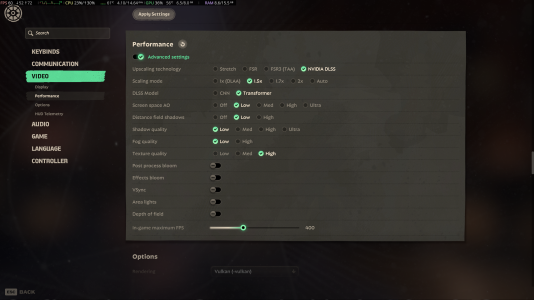
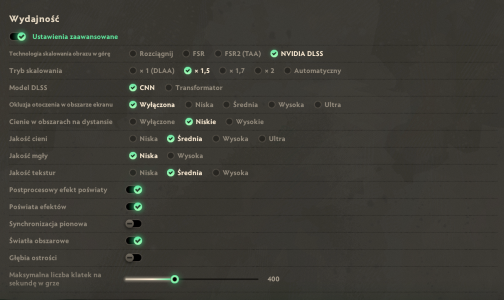
I attached my settings so that you can test using my setup. I believe its very performance friendly. On my end these settings don't stress my gpu beyond like 50%.
 

Attachments
  • Zrzut ekranu 2026-03-13 215111.png
    Zrzut ekranu 2026-03-13 215111.png
    1,006.3 KB · Views: 6
Last edited:
I don't think this is an issue with the game, but rather a problem on your end. I have old first edition 2060 which never even had its thermal paste replaced and it never bottlenecks (in a manner of speaking, obviously, but not in a sense of causing problems). Game runs on more or less 120fps at all times, no stutters, no lag. Didn't have any "leaks" either.

poisonfree97 your PC parts seem fine (other than the cpu perhaps), so you should not have this issue at all. I have a couple ideas you can try.

0. Obviously the first thing you should check is if you have some random outdated mods, and if so, throw them to the void. Also check if you have some unwanted start options in steam, like "-vulcan" for example. I recommend leaving all that blank.

1. Set lowest/medium settings, turn on dlss, close the game and clean your shader cache (best if you just delete all of it). Restart the game and test. If the issue persists, try windowed mode, if that doesn't change nothing, install the game on other drive, preferably fast one.

2. If that doesn't cut it, then I suspect your OS is doing this. If I were you I'd reinstall windows and test it again.
It doesn't hurt to do that every now and then anyways, so troubleshooting is as good opportunity as any.

Other people in this thread though seem to have way outdated cpu/ram, so I doubt the stutters they report are even connected to any sort of gpu problem, most likely just cpu bottleneck, or extensive use of pagefile (i bet using space from some old hdd, considering other pc parts). You can't underestimate the impact ram and cpu has on games. I upgraded to 7800x3d and 32gb of ddr5 about 6 months ago, and my fps in cs literaly jumped from unstable ~120 with drops below 60, to solid ~280+ (despite staying on old 2060). Deadlock has way higher requirements than cs, so it is only fair your game runs like shit on cpu like ryzen 3600 and 16 gb of some 2200 mhz CAS 69 ram.

I honestly made the account just to reply to this thread, because you seem to bump it every 10 minutes or so. I recommend you try what I said. I really doubt this is game level issue because there's literally no reports of any issue of such kind other than this thread, and as mentioned, I experience no such problem myself either.

Hope this can be of help. Cheers!
I apologize for my English.
The video memory problems started after a major update with new heroes, and I've been playing since 2024.
I've been constantly looking at similar discussions on this forum, trying to do what they're saying, but it hasn't worked out.
1. I've rolled back the video card and Windows updates.
2. I've experimented with game settings, changing the configuration and disabling a lot of things that were loading the video card.
3. I've deleted the video card cache and done a lot of other things.
Literally everything that could help and helped other people. All I know is that the problems started after the patch. My configuration is above the minimum requirement for this game. The problem is no longer that the FPS is low, but that it is not stable. The constant stutters and FPS fluctuations make it impossible to play and react properly.
 
And in the last year I have already met a similar problem, I was playing poe2 and at the time of the last patch in November, the same happened, the video memory was simply filled to the brim and the game stopped working normally. I don't know what it is connected with, but I don't think that patches raise the performance requirements so much.
 
Rolling back updates won't do much. I recommend full os reinstallation. The fact that the problems occurs in other games only gives this idea more sense. It proves its not just deadlock issue.

And it is important that you make a clean installation. Obviously you can keep data on every other drive than your boot drive, but that one has to go full clean if you want any results from this.

Also, what version of windows are you running? This should have minimal impact, but if you're on something dated, like windows 8, you might consider updating that.
 
Last edited:
Откат обновлений мало что даст. Я рекомендую полностью переустановить операционную систему. Тот факт, что проблемы возникают и в других играх, только подтверждает эту мысль. Это доказывает, что дело не только в зависаниях.

Важно выполнить чистую установку. Разумеется, вы можете сохранить данные на всех дисках, кроме загрузочного, но на загрузочном диске должна быть полная очистка, если вы хотите добиться каких-либо результатов.

Кроме того, какая у вас версия Windows? Это не должно сильно повлиять на работу, но если у вас устаревшая версия, например Windows 8, возможно, стоит ее обновить.
Я попробую, но, честно говоря, судя по количеству тем и просмотров на форумах, это довольно распространенная проблема. Я все еще имею в виду обновления игр. Иногда утечки происходят по нелепым причинам или из-за мелких ошибок в коде.1773436838441.png
 
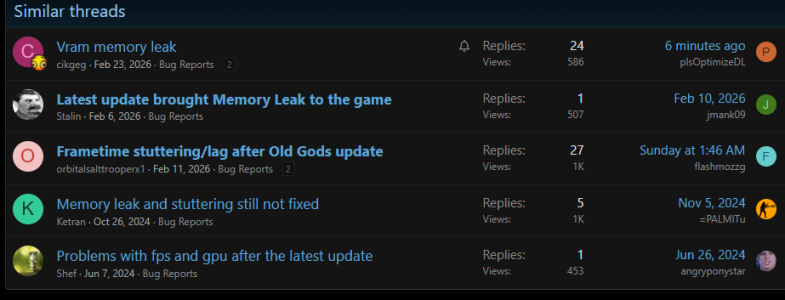
I mean sure, there are a couple of threads, but 2 on the screenshot are 2 years old, and the rest have combined 2 thousand views, so the problem is fairly rare if you consider the game had recently about 100k concurrent players. If that was a common issue, there ought to have been more reports than that, and more people looking at the forum.

If you decide to reinstall windows, make sure you backup all data you don't want to lose. It would be a shame to lose files because of a game. No need to be hasty with this.
 
I mean sure, there are a couple of threads, but 2 on the screenshot are 2 years old, and the rest have combined 2 thousand views, so the problem is fairly rare if you consider the game had recently about 100k concurrent players. If that was a common issue, there ought to have been more reports than that, and more people looking at the forum.

If you decide to reinstall windows, make sure you backup all data you don't want to lose. It would be a shame to lose files because of a game. No need to be hasty with this.
These topics get dozens of more views than others, which is already an indicator.
There are 3,000 views on the neighboring thread.
Considering that less than half of the players use the forum, I think this is significant.
 
I don't think this is an issue with the game, but rather a problem on your end. I have old first edition 2060 which never even had its thermal paste replaced and it never bottlenecks (in a manner of speaking, obviously, but not in a sense of causing problems). Game runs on more or less 120-150fps at all times, no stutters, no lag. Didn't have any "leaks" either.

poisonfree97 your PC parts seem fine (other than the cpu perhaps), so you should not have this issue at all. I have a couple ideas you can try.

0. Obviously the first thing you should check is if you have some random outdated mods, and if so, throw them to the void. Also check if you have some unwanted start options in steam, like "-vulcan" for example. I recommend leaving all that blank.

1. Set lowest/medium settings, turn on dlss, close the game and clean your shader cache (best if you just delete all of it). Restart the game and test. If the issue persists, try windowed mode, if that doesn't change nothing, install the game on other drive, preferably fast one.

2. If that doesn't cut it, then I suspect your OS is doing this. If I were you I'd reinstall windows and test it again.
It doesn't hurt to do that every now and then anyways, so troubleshooting is as good opportunity as any.

Other people in this thread though seem to have way outdated cpu/ram, so I doubt the stutters they report are even connected to any sort of gpu problem, most likely just cpu bottleneck, or extensive use of pagefile (i bet using space from some old hdd, considering other pc parts). You can't underestimate the impact ram and cpu has on games. I upgraded to 7800x3d and 32gb of ddr5 about 6 months ago, and my fps in cs literaly jumped from unstable ~120 with drops below 60, to solid ~280+ (despite staying on old 2060). Deadlock has way higher requirements than cs, so it is only fair your game runs like shit on cpu like ryzen 3600 and 16 gb of some 2200 mhz CAS 69 ram.

I honestly made the account just to reply to this thread, because you seem to bump it every 10 minutes or so. I recommend you try what I said. I really doubt this is game level issue because there's literally no reports of any issue of such kind other than this thread, and as mentioned, I experience no such problem myself either.

Hope this can be of help. Cheers!

I attached my settings so that you can test using my setup. I believe its very performance friendly. On my end these settings don't stress my gpu beyond like 50%.
appreciate the effort, but your entire argument kind of falls apart when you consider that people with 4090s, 7900 XTXs and freshly installed systems are reporting the exact same issue. this isn't a "your RAM is slow" or "reinstall windows" situation. the VRAM leak has been documented on highend rigs across different operating systems, including linux, where none of your suggested fixes even apply. so the idea that your 2060 running fine somehow disproves a bug that valve themselves have acknowledged is a bit of a stretch.

also the fact that you made an account specifically to tell someone their pc is bad, while offering "reinstall windows" as a serious troubleshooting step for what is clearly a game-side memory XDDDD just be quiet
 
I offered good advice that could work for a number of reasons. It doesn't hurt to try. There are a number of advantages of cleaning your os drive every now and then, you can google it if you don't believe me. Besides windows reinstall I also gave some less invasive basic things to try. I guess you didn't see them?

I didn't make an account to tell people their pc's are bad. I literally play on 2060. The only remark about bad pc's I made was about people who report stability issues playing on machines too dated to run minecraft.

"people with 4090s, 7900 XTXs and freshly installed systems are reporting the exact same issue" - while this might suggest something is indeed happening, in my experience, at least half of the people who use computers on a daily basis are not knowledgeable enough to do so without getting technical problems. Those people you mention might as well just buy a pc in walmart, install no drivers, change no settings in windows, and try to rock a game, while their selected gpu is integrated graphics card. Game might have a rare vram leak, sure, people might also report something completely different as that due to their ignorance.

The leak might be documented, but is still extremely rare, so the probability that it's user side issue that can be resolved by troubleshooting locally is much more likely than that it's caused by the game (at least to an extent, maybe it is caused by it? Maybe it's a different problem that has nothing to do with vram leak?). The guy who made this thread literally said the problem occurs in other games on their machine. I can't fathom how deadlock might cause his entire computer to suddenly leak memory left and right in every app. Can you? Or did you just want to make a snazzy little comment to belittle someone? I see you only just made your account as well. So, am I right, or am I right? That "XDDDD just be quiet" gives me an idea :)

Cheers

Btw. Im not denying the existance of the problem, I literaly made this comment to suggest ways to resolve it. Nothing more, nothing less.
 
Same crap on 4070 8GB - after ~2 full matches the game starts stuttering and it gets progressively worse until I restart it. For my friend it's even worse. It was true even before Old Gods update but happened after longer play time. Got a little better with the recent updates but is still present.
 
I reinstalled the computer's operating system and downloaded the game again, but nothing changed. The only thing is that I have no problems playing on the test map, but as soon as I enter the lobby or start playing, I encounter the same issue.
 
I'll try to duplicate the links to all the topics with a similar problem, so that if the developers finally look here, they can find more information about this issue.
1.FRAMETIME Heavy stuttering / FPS + reproducing
2.FPS Drops (300 -> 2 fps) micro stutters post Old Gods, New Blood
3.fps demolishing
4.FPS problem after new 6 heroes update. Low graphic card load (only 40%).
5.Massive FPS drops after 20-40 minutes of gameplay
6.FPS problem during the matches
7.FPS regression after recent update (CPU & GPU load ~40–50%, FPS capped lower than before)
8.Low FPS (40-60) in-game, normal in the main menu after the update on January 23, 2026
9.FPS drops to zero
10.FPS Problems with Nvidia + Windows LTSC 2021
11.the fps is oscillating from 100 to 10 fps, im using a RX 7600 and this only affects Deadlock
12.Huge FPS drops making game unplayable
13.[Performance] Newest update haven't brought any fixes on Doorman's Doors FPS tanking and Memory Leaking
 
I'm also experiencing the same issue which also seems related to vram leak (I think it improved a little bit on this patch). I start the game with 170 fps and using 6.4GB out of 8GB of vram and in some random games the vram reaches the 8GB max and fps start tanking to 15 or so.

OS: CachyOS x86_64
Proton experimental
Motherboard: Gigabyte A520M K V2
Kernel: Linux 6.19.6-2-cachyos
CPU: AMD Ryzen 5 5600X @ 4.65 GHz
GPU: NVIDIA GeForce RTX 3070
Memory: 2x8GB DDR4 3600 MT
SSD: 1TB KINGSTON SNV2S1000G


This is the only game I have experienced this and I have only really noticed it in the standard matches I haven't seen the issue in street brawl.
 

Attachments

  • Screenshot_20260315_022833.png
    Screenshot_20260315_022833.png
    2.6 MB · Views: 3
Back
Top