Severe Frametime Spikes When Pressing Keyboard or Mouse Inputs

SAND

New member
Description:
I’ve been noticing consistent frametime spikes whenever I press any keyboard key or mouse button while playing Deadlock.
Even though my average FPS is very high, the input causes visible stutter and a sharp drop in 0.1% lows.


For example, my 0.1% lows drop from around 120+ down to ~40 FPS whenever I press a key or click the mouse.
The stutters stop completely when no inputs are being made.


This issue doesn’t occur in other Source 2 or DX12 games like CS2 or BO6, so it seems unique to Deadlock.
View attachment 314dd750-a64f-4ad4-9021-9ff5aa2959bd.mp4


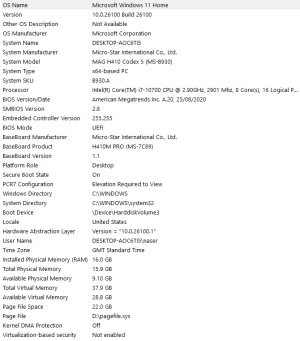
My system specs:
  • CPU: Ryzen 7 5800X3D
  • GPU: RTX 4080
  • RAM: 32 GB DDR4-3600 MHz CL18
  • OS: Windows 11 (latest updates)
  • Drivers: Latest NVIDIA + AMD chipset drivers installed


What I’ve tried so far:
  • Reinstalled the game
  • Changed USB ports (rear I/O and front)
  • Disabled all background apps (G Hub, iCUE, Synapse, etc.)
  • Tested different keyboard/mouse polling rates (1000 → 500 → 250 Hz)
  • Tried both Vulkan and DX11 renderers
  • Verified game files and reinstalled drivers
  • Windows reset
  • Disabled Wi-Fi and Bluetooth in the BIOS

No improvement — the issue persists across all configurations.


Notes:
The frametime spikes are very consistent and reproducible.
It feels like input events are being processed on the same thread as rendering, which causes momentary stalls each time an input is registered.
Average frame times remain low and stable when no input is pressed. This has not always been a problem — it started occurring about a month ago. It’s been driving me crazy because I thought something was wrong with my PC, but I finally figured out it’s caused by Deadlock itself.
 
UPDATE:


Fixed! The FPS drops when pressing keys or clicking the mouse were resolved by:


  1. Disabling fullscreen optimizations on the Deadlock executable.
  2. Running the game directly from the desktop instead of launching it through Steam.

After this, my FPS is completely stable, even during input.
 
I am also confirming this issue, except it is far more severe with me, in the sense that the game will freeze for several seconds at a time. I will try to implement your fix and see if it helps.

I am running an R7 7700x, RTX 4060, 64 GB DDR5, with Windows 11 and up-to-date NVIDIA drivers (version 581.80.) I want to clarify that under 580.97 (the previous NVIDIA driver version I was running), Deadlock ran perfectly smoothly, with no frame stutters of any kind. I have also isolated the issue to Deadlock, as other games ran smoothly.
 
I am also confirming this issue, except it is far more severe with me, in the sense that the game will freeze for several seconds at a time. I will try to implement your fix and see if it helps.

I am running an R7 7700x, RTX 4060, 64 GB DDR5, with Windows 11 and up-to-date NVIDIA drivers (version 581.80.) I want to clarify that under 580.97 (the previous NVIDIA driver version I was running), Deadlock ran perfectly smoothly, with no frame stutters of any kind. I have also isolated the issue to Deadlock, as other games ran smoothly.
Did it work?
 
I was having the exact same issues that longlivesand was having, my system is 9800X3D, 5070ti, 32GB RAM and Windows 11, using the 581.47 Nvidia drivers. I tried turning all settings down, DX11/Vulkan, etc, and I can confirm that the only thing that fixed it was doing what he suggested which was :

  1. Disabling fullscreen optimizations on the Deadlock executable.
  2. Running the game directly from the desktop instead of launching it through Steam.
The game will keep on stuttering unless I do exactly these two steps, and I can reproduce these results every single time. I don't feel like I need to share my own video because it looks exactly like the one from the original post showing the same frametime spikes, but I could do it if any devs are reading this post and need more proofs.
 
Go to SeamLibrary\steamapps\common\Deadlock\game\bin\win64, find deadlock.exe, right click properties, compatibility tab and it's there.
 
Hello, sorry to revive this old thread, but this bug/performance issue is still present in the newest patch. See the video from the original post that is still relevant. However, the initial fix posted in the thread still works. But this is an ongoing issue that makes the game very stuttery and it would be great if devs would look into it.
 
I'm having a similar issue where I'm constantly getting frame stutters/hitching in a consistent ~3s interval, going from 172 FPS down to ~43 for a brief moment. Simply when moving the camera or walking around.

Doing the cited below (it's important to follow both steps!) fixed it for me!
It's all smooth now. Thank you a lot for mentioning!

UPDATE:


Fixed! The FPS drops when pressing keys or clicking the mouse were resolved by:


  1. Disabling fullscreen optimizations on the Deadlock executable.
  2. Running the game directly from the desktop instead of launching it through Steam.

After this, my FPS is completely stable, even during input.


This feels to be some kind of frame pacing issue, maybe there's something not playing right with G-Sync/V-Sync - I'm not sure, but it doesn't seem to be performance related. My GPU and CPU were chilling, and lowering graphics settings also didn't help before.


My settings/specs:
I use dx11, G-Sync and Reflex: on, with the usual settings enabled for it: V-Sync enabled in Nvidia Control Panel but disabled ingame, as well as Low Latency Mode set to Ultra.
RTX 5070 Ti, i5 13600KF
GPU driver version: 591.74
Windows 11 24H2 (Build 26100.7623)
 
UPDATE 2:
Issue Summary:

When launching Deadlock through the Steam Client, severe frametime spikes occur every time mouse or keyboard input is provided. These spikes stabilize after a few seconds of no input but return immediately upon movement. This issue does not occur when launching deadlock.exe directly from the file folder, nor is it caused by RTSS (RivaTuner), as the stutter persists even when RTSS is disabled.

The Fix:
Setting the game executable to Run as Administrator completely resolves the stuttering when launching through Steam.
Steps to Apply:
  1. Navigate to: ...\SteamApps\common\Deadlock\game\bin\win64
  2. Right-click project8.exe (or Deadlock.exe) and select Properties.
  3. Under the Compatibility tab, check "Run this program as an administrator".
  4. Apply and launch via Steam.

Something is definitely wrong with how the game hooks input when it’s launched normally. I don’t know if this happens to everyone, or if I only notice it because I’m watching a frametime graph and am very sensitive to microstutter. Also, most “normal” players don’t look at the 0.1% lows, where it really becomes noticeable. Still, I really think the devs should look into this issue.
 
Interesting, I'm gonna try these steps because I did the method you previously said was working which still works in this patch. Do you still disable full screen optimization in the exe's properties?

EDIT : also to your last point, while I agree that most people will not notice these microstutters as they're not huge frametime spikes, they're still very noticeable to me. And their consistency is the worrying part. But at least we have a working fix for now.
 
Last edited:
Interesting, I'm gonna try these steps because I did the method you previously said was working which still works in this patch. Do you still disable full screen optimization in the exe's properties?
You don’t have to disable fullscreen optimizations. This fix removes the stutter while also allowing the game to be launched through Steam instead of having to open it from the bin folder like before.
 
Interesting, I'm gonna try these steps because I did the method you previously said was working which still works in this patch. Do you still disable full screen optimization in the exe's properties?

EDIT : also to your last point, while I agree that most people will not notice these microstutters as they're not huge frametime spikes, they're still very noticeable to me. And their consistency is the worrying part. But at least we have a working fix for now.
It feels hard to get the devs’ attention on this, even though it’s a pretty crucial issue for how the game feels. Especially for players who don’t know how to fix it themselves.
 
Back
Top