Severe Frametime Spikes When Pressing Keyboard or Mouse Inputs

This does not look like a hooking issue. What kind of GPU do you have? Maybe I’m able to help with the lag. And do you use dlss?
Hello, Thank you for offering to help out, much appreciated!

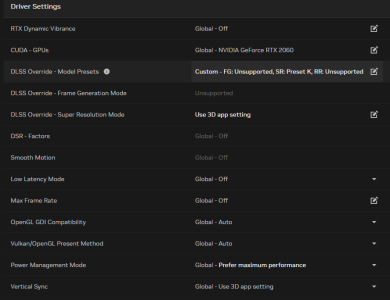
I have an NVIDIA GeForce RTX 2060 and as for DLSS, I think I followed a short guide on these same forums (different thread) in which I disabled the newest version of DLSS from the NVIDIA app, instead opting to use an older DLSS model override preset as shown here:

1769778245936.png
 
Hello, Thank you for offering to help out, much appreciated!

I have an NVIDIA GeForce RTX 2060 and as for DLSS, I think I followed a short guide on these same forums (different thread) in which I disabled the newest version of DLSS from the NVIDIA app, instead opting to use an older DLSS model override preset as shown here:

View attachment 79693
Preset K should be dlss 4.5 which could cause your problem. Maybe you should try and roll back to a nvidia driver before the new dlss, and see if your game lag disappears.
 
Did it solve your issue?
Hi, I tried the rollback as well as a few other workarounds and here is what I have found through testing:

Essentially I feel like the issue is with a certain "trigger" or "event" that happens at some point in the game. The game loads something in and I immediately feel a huge downgrade in performance until I restart the game or sometimes even a reconnect.


I tried fiddling with literally every setting but my results are based on this "trigger" occurring. I cannot reliably find out what causes it, only to place a marker on my steam recording when it does happen (sorry I'm not very good with diagnostics >.<).

The one thing that fixed the "hitching" for me was to switch from DLSS in game to FSR 2 and to use the older transformer model instead of the newer beta one. That made it so when I lag, instead of the game stuttering, it will just reduce my performance significantly.

So, in the course of a normal match of Deadlock, I will usually hover around 140 FPS reliably, even during teamfights. However, once that "trigger" happens it instantly PLUMMETS down to 30-40 FPS average that significantly decreases when in certain areas of the map such as Yellow and Blue lane. Sometimes a reconnect fixes it, and sometimes it doesn't. Often, the game will even crash after I reconnect :(
 
Edit: Seems to be related to MSI Afterburner running in the background, check post below!
3 months later I decided to check out if this issue still exists, and yep it still persists for me sadly.
As described before: As long as I move my character or camera around, I keep having a stutter happen every 5 seconds.
However, if you set the properties of deadlock.exe (in SteamLibrary\steamapps\common\Project8Staging\game\bin\win64) to be run as admin, this stutter completely disappears and the game is finally smooth as butter.

My FPS Graph shows it very clearly:
Stuttering every 5s; not running as admin: 1773428439893.png
Smooth; running deadlock.exe as admin: 1773428497284.png

I hope we can get some attention to this, since at least on my system it's 100% reproducible and there is an easy fix/workaround for it, which also works for others here as well.


Additional clips showing the stutter:
Stuttering every 5s; not running as admin:

View attachment Stutter (Not Running As Admin) 2026-03-13 19-43-35.mp4

Smooth; running deadlock.exe as admin:
View attachment Stutter Free (Run As Admin) 2026-03-13 19-47-03.mp4
RTX 5070 Ti, i5 13600KF
@1440p, DLSS Transformer Quality, High graphics
GPU driver version: 595.79, also was an issue on 591.74
Windows 11 25H2 (Build 26200.7840) also was an issue on 24H2 (Build 26100.7623)
 
Last edited:
Hi,

Can you take a PerfView trace to help us track down the issue? Instructions for taking a PerfView capture can be found on the wiki: https://developer.valvesoftware.com/wiki/PerfView#Preparing_to_Trace . Make sure to follow these steps exactly.

Once you have a .zip file, you can DM it to me here on the forums. Please also mention what OS, CPU, and GPU you are using.
Hey, thank you for your attention. Following the preparation steps there I now have found out that this stutter is linked to MSI Afterburner (while running deadlock.exe not as admin and moving your character).

Even though it's minimized, no overlay active, and despite me having turned off "Power" & "Power Percent" monitoring (often described as the fix for the cause of frame stutters related to MSI Afterburner, which worked for me in other games).
Once I fully exit MSI Afterburner the stutters disappears.

Also I have to correct myself, this stutter only happens for me when moving my character/using the keyboard. It does not happen when just moving the camera/mouse.

Do you still want me to do a PerfView trace when this issue occurs? So MSI Afterburner running minimized, deadlock.exe not running as admin, using keyboard to move around?
Also sorry for the "false alarm", I didn't think of MSI Afterburner possibly causing this stutter linked to moving my char/using the keyboard, as this hasn't been an issue in other games for me.
 
Back
Top