serge24680
New member
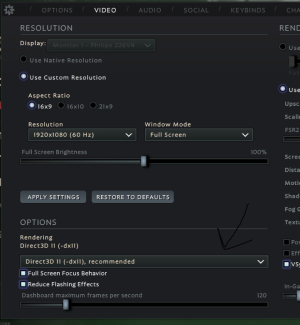
I installed Vulka in the settings and now the game does not start. How to return Diect X back ?
Hellp pls.
Hellp pls.
Follow along with the video below to see how to install our site as a web app on your home screen.
Note: This feature may not be available in some browsers.
Broo.... The game just won't start
I think your post still makes sense since there should be some kind of fail safe to prevent players from locking themselves out of the game. Maybe a prompt that asks you to confirm your choice (after the setting has been applied ofc), similar to how windows does it when you change the resolution for example.After searching for a while I found a solution. Manually edit boot.vcfg. Add -dx11.
File location C:\Program Files (x86)\Steam\steamapps\common\Deadlock\game\citadel\cfg
We can close the topic. I was too hasty with the opening.
The thing is that the changes are applied only after the game is restarted. I chose Vulkan, restarted the game and it no longer starts)))I think your post still makes sense since there should be some kind of fail safe to prevent players from locking themselves out of the game. Maybe a prompt that asks you to confirm your choice (after the setting has been applied ofc), similar to how windows does it when you change the resolution for example.