vinimascoff
New member
ive also reinstalled windows just in case
Follow along with the video below to see how to install our site as a web app on your home screen.
Note: This feature may not be available in some browsers.
It's good that I don't have to go through that.ive also reinstalled windows just in case
I tried Linux as well with no luck. I think might have some to do with gpu since I'm the only out of my friends that has this issue and the only one with a amd card but I don't really know.ive also reinstalled windows just in case
> Verify filesAbsolute legend. thank you so frickin much dude. I had to unbind my comm wheel key bind just so i could play.Guys, I think I found the solution. Well, it solved it for me at least:
> Find these directories: (Based on your Steam folder)
> C:\Program Files (x86)\Steam\steamapps\common\Deadlock\game\citadel\cfg (Local config)
and
> C:\Program Files (x86)\Steam\userdata\YourAccountID\1422450 (Cloud save backup config)
> 1422450 is Deadlock's ID
> Delete both "CFG" and "1422450" folders
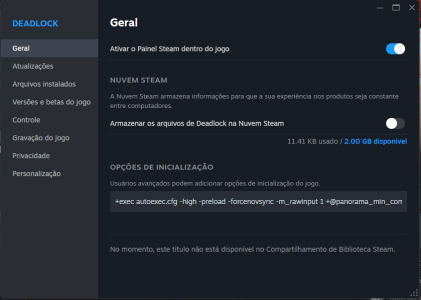
> Disable Deadlocks Cloud save feature as shown in the image. View attachment 83989> Verify files
> Open the game
> try opening settings
Tell me if it worked for you.
Guys, I think I found the solution. Well, it solved it for me at least:
> Find these directories: (Based on your Steam folder)
> C:\Program Files (x86)\Steam\steamapps\common\Deadlock\game\citadel\cfg (Local config)
and
> C:\Program Files (x86)\Steam\userdata\YourAccountID\1422450 (Cloud save backup config)
> 1422450 is Deadlock's ID
> Delete both "CFG" and "1422450" folders
> Disable Deadlocks Cloud save feature as shown in the image. View attachment 83989> Verify files
> Open the game
> try opening settings
Tell me if it worked for you.
i love you bro, it worked for meGuys, I think I found the solution. Well, it solved it for me at least:
> Find these directories: (Based on your Steam folder)
> C:\Program Files (x86)\Steam\steamapps\common\Deadlock\game\citadel\cfg (Local config)
and
> C:\Program Files (x86)\Steam\userdata\YourAccountID\1422450 (Cloud save backup config)
> 1422450 is Deadlock's ID
> Delete both "CFG" and "1422450" folders
> Disable Deadlocks Cloud save feature as shown in the image. View attachment 83989> Verify files
> Open the game
> try opening settings
Tell me if it worked for you.