opening the settings causes the game crash

Guys, I think I found the solution. Well, it solved it for me at least:
> Find these directories: (Based on your Steam folder)
> C:\Program Files (x86)\Steam\steamapps\common\Deadlock\game\citadel\cfg (Local config)
and
> C:\Program Files (x86)\Steam\userdata\YourAccountID\1422450 (Cloud save backup config)
> 1422450 is Deadlock's ID
> Delete both "CFG" and "1422450" folders
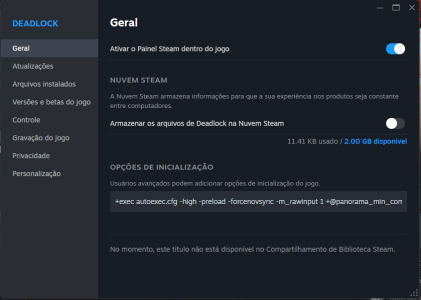
> Disable Deadlocks Cloud save feature as shown in the image. 1771020457623.png> Verify files
> Open the game
> try opening settings

Tell me if it worked for you.
 
  • Like
Reactions: Cos
Guys, I think I found the solution. Well, it solved it for me at least:
> Find these directories: (Based on your Steam folder)
> C:\Program Files (x86)\Steam\steamapps\common\Deadlock\game\citadel\cfg (Local config)
and
> C:\Program Files (x86)\Steam\userdata\YourAccountID\1422450 (Cloud save backup config)
> 1422450 is Deadlock's ID
> Delete both "CFG" and "1422450" folders
> Disable Deadlocks Cloud save feature as shown in the image. View attachment 83989> Verify files
> Open the game
> try opening settings

Tell me if it worked for you.
Absolute legend. thank you so frickin much dude. I had to unbind my comm wheel key bind just so i could play.
 
Guys, I think I found the solution. Well, it solved it for me at least:
> Find these directories: (Based on your Steam folder)
> C:\Program Files (x86)\Steam\steamapps\common\Deadlock\game\citadel\cfg (Local config)
and
> C:\Program Files (x86)\Steam\userdata\YourAccountID\1422450 (Cloud save backup config)
> 1422450 is Deadlock's ID
> Delete both "CFG" and "1422450" folders
> Disable Deadlocks Cloud save feature as shown in the image. View attachment 83989> Verify files
> Open the game
> try opening settings

Tell me if it worked for you.
Thanks that worked for me as well!!!
giphy.gif
 
Last edited:
Guys, I think I found the solution. Well, it solved it for me at least:
> Find these directories: (Based on your Steam folder)
> C:\Program Files (x86)\Steam\steamapps\common\Deadlock\game\citadel\cfg (Local config)
and
> C:\Program Files (x86)\Steam\userdata\YourAccountID\1422450 (Cloud save backup config)
> 1422450 is Deadlock's ID
> Delete both "CFG" and "1422450" folders
> Disable Deadlocks Cloud save feature as shown in the image. View attachment 83989> Verify files
> Open the game
> try opening settings

Tell me if it worked for you.
i love you bro, it worked for me
 
Back
Top