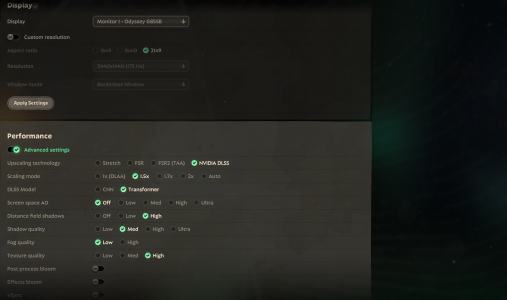
I am new to this forum, but briefly looking over it, I am seeing that many other players are experiencing the same issues as me. This was never an issue to me in the past, but now whenever I join a game, my game crashes and I receive a queue ban. I've spent 12+ hours trying to fix this issue involving my graphics card, game cache, coding, etc. I would really appreciate it if a mod can lift my play ban or atleast provide any details if they plan to fix this bug. Attached to this post is a writeup of some of the changes I completed on my computer.
Hello,
I’m experiencing consistent crashes/freezes in Deadlock while using an NVIDIA RTX 2060. Here are the details:
- **GPU:** NVIDIA RTX 2060
- My driver has been fully updated, crashes still occured, and I went back to old driver
- **Windows 11
- **Game version:** Steam DX11 build (Engine.ini override applied)
**Problem:**
- Game freezes in lobby/menu after shaders start compiling.
- Audio continues but the screen is frozen.
- Event Viewer shows:
- Source: nvlddmkm
- Event ID: 0
- First in-game movement can cause noticeable lag or FPS drops.
**Steps I’ve already tried:**
1. Forced DX11 using Engine.ini:
[/Script/Deadlock.DeadlockGameEngine]
bUseDX12=False
bForceDX11=True
2. Deleted all Steam + NVIDIA shader caches.
3. Adjusted NVIDIA settings:
- Shader Cache Size = Unlimited
- Power Management = Maximum Performance
- Threaded Optimization = ON
- Low Latency Mode = OFF
- V-Sync = OFF
4. Steam launch option: `-fps_max 60`
5. Windowed Borderless mode for stability monitoring.
6. DDU and reinstall
7. Windows registry check
**Additional notes:**
- Menus are choppy initially due to shader compilation.
- FPS stabilizes (~55–60) after ~10–15 minutes in the menu.
- Freeze often happens when moving in the lobby or first entering a match.
**Logs / Attachments:**
- Event Viewer nvlddmkm crash logs
- DXDiag
I’m looking for guidance on how to prevent these freezes during lobby/menu shader compilation. Is there anything else I should do? Did I go overboard? Can a mod please remove my bans and queue punishment? Any help would be appreciated!
Thank you.
Hello,
I’m experiencing consistent crashes/freezes in Deadlock while using an NVIDIA RTX 2060. Here are the details:
- **GPU:** NVIDIA RTX 2060
- My driver has been fully updated, crashes still occured, and I went back to old driver
- **Windows 11
- **Game version:** Steam DX11 build (Engine.ini override applied)
**Problem:**
- Game freezes in lobby/menu after shaders start compiling.
- Audio continues but the screen is frozen.
- Event Viewer shows:
- Source: nvlddmkm
- Event ID: 0
- First in-game movement can cause noticeable lag or FPS drops.
**Steps I’ve already tried:**
1. Forced DX11 using Engine.ini:
[/Script/Deadlock.DeadlockGameEngine]
bUseDX12=False
bForceDX11=True
2. Deleted all Steam + NVIDIA shader caches.
3. Adjusted NVIDIA settings:
- Shader Cache Size = Unlimited
- Power Management = Maximum Performance
- Threaded Optimization = ON
- Low Latency Mode = OFF
- V-Sync = OFF
4. Steam launch option: `-fps_max 60`
5. Windowed Borderless mode for stability monitoring.
6. DDU and reinstall
7. Windows registry check
**Additional notes:**
- Menus are choppy initially due to shader compilation.
- FPS stabilizes (~55–60) after ~10–15 minutes in the menu.
- Freeze often happens when moving in the lobby or first entering a match.
**Logs / Attachments:**
- Event Viewer nvlddmkm crash logs
- DXDiag
I’m looking for guidance on how to prevent these freezes during lobby/menu shader compilation. Is there anything else I should do? Did I go overboard? Can a mod please remove my bans and queue punishment? Any help would be appreciated!
Thank you.