

valleyofscreams
New member
What happens is
i click launch on steam
the valve logo appears for 3 seconds then the in game cursor appears and the game closes itself with no crash report or error
i know it works because i used to play it on the exact same laptop before, i found a few threads with the same error but none had a solution to this, my friend had this bug too but it randomly went away for him, around january it started crashing after valve logo and since then i have not been able to play, this is really bumming me out, i tried reinstalling the game, updating drivers and even after wiping my laptop to clear it out it still crashes on a fresh install, i have found a lot of possible solutions online but none worked for me sadly
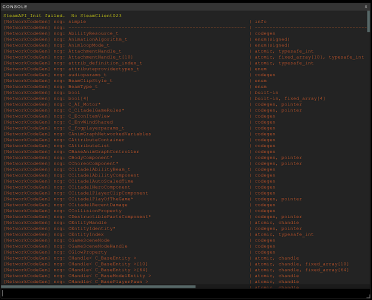
my friend recommended me to quickly try and open the console and take a screenshot of it before the game closed because the game does not generate crash logs, i am not sure how helpful this is but this is the screenshot of the console right before the game closes
the solutions i tried are
delete boot.vcfg
verify file integrity in steam and reinstall the game
launch steam/deadlock.exe as admin(tried both)
reinstall steam entirely (did not work)
launch with -vulkan and -dx11
launch in windowed/borderless mode
disable steam overlay
delete video.txt or replace video.txt with video.txt.bak
i click launch on steam
the valve logo appears for 3 seconds then the in game cursor appears and the game closes itself with no crash report or error
i know it works because i used to play it on the exact same laptop before, i found a few threads with the same error but none had a solution to this, my friend had this bug too but it randomly went away for him, around january it started crashing after valve logo and since then i have not been able to play, this is really bumming me out, i tried reinstalling the game, updating drivers and even after wiping my laptop to clear it out it still crashes on a fresh install, i have found a lot of possible solutions online but none worked for me sadly
my friend recommended me to quickly try and open the console and take a screenshot of it before the game closed because the game does not generate crash logs, i am not sure how helpful this is but this is the screenshot of the console right before the game closes
the solutions i tried are
delete boot.vcfg
verify file integrity in steam and reinstall the game
launch steam/deadlock.exe as admin(tried both)
reinstall steam entirely (did not work)
launch with -vulkan and -dx11
launch in windowed/borderless mode
disable steam overlay
delete video.txt or replace video.txt with video.txt.bak
