Deadlock crashes my PC (Detailed INFO)

bellanpeter39

New member
Issue (only in Deadlock):
My PC crashes while playing Deadlock. Screens go black / “No Signal” and I often have to hard reboot. Sometimes it also BSODs.

What I found in Windows logs:

  • BSOD stop code: VIDEO_SCHEDULER_INTERNAL_ERROR
  • Event Viewer → System:
    • Display Event ID 4101: “Display driver nvlddmkm stopped responding and was recovered.”
    • nvlddmkm Event ID 153 (GPU/driver related, “Error occurred on GPUID …”)
    • After the crash I sometimes see Kernel-Power 41 (hard reboot)
  • I also see DistributedCOM 10016 warnings around the same time, but those are common Windows log spam and don’t seem directly tied to the crash.
Troubleshooting already tried:

  • Reinstalled NVIDIA GPU drivers (issue still happens)
  • Reinstalled Deadlock
  • Installed Deadlock again on a brand new SSD (fresh install location)
  • Checked temps → temps look good
  • Disabled all overlays: Discord Overlay / Steam Overlay / GeForce Experience Overlay / Xbox Game Bar
  • Disabled Hardware-Accelerated GPU Scheduling (HAGS) in Windows:
    Settings → System → Display → Graphics → Default graphics settings → HAGS OFF → reboot
  • Disabled hardware acceleration in Chrome (just in case):
    Chrome → Settings → System → Hardware acceleration OFF → restart
  • MSI Afterburner: disabled “Enable low-level IO driver” and “Enable low-level hardware access”
  • Ran an aggressive full virus/malware scan to rule out background resource usage
PC specs:

  • CPU: AMD Ryzen 5 5600X (6-core, 3.70 GHz)
  • GPU: NVIDIA GeForce RTX 3080 Ti (12 GB)
  • RAM: 32 GB
  • Storage:
    • Samsung 980 PRO with Heatsink 2TB
    • Samsung 990 PRO 2TB (x2)
  • System: Windows 64-bit, x64-based processor
System / Motherboard / BIOS:

  • OS: Windows 10 Home (10.0.19045 / Build 19045)
  • Motherboard: MSI MPG X570S CARBON MAX WIFI (MS-7D52)
  • BIOS: AMI v1.B0 (24.03.2025)
  • Boot mode: UEFI
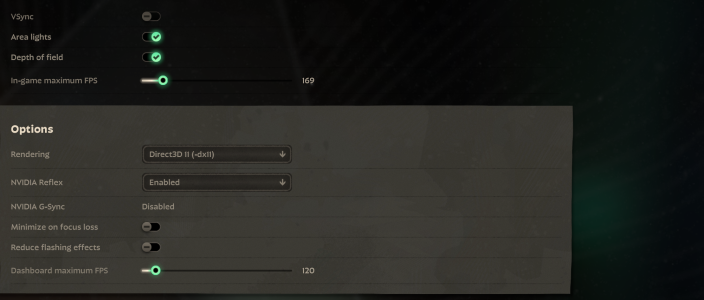
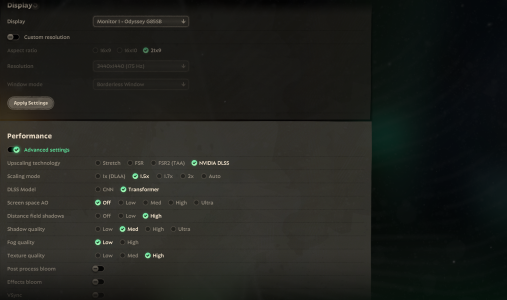
If anyone has had this specifically with Deadlock (nvlddmkm 4101 / VIDEO_SCHEDULER_INTERNAL_ERROR / black screen no signal), I’d appreciate any fixes or Deadlock settings that helped.
 

Attachments

  • Unbenannt.PNG
    Unbenannt.PNG
    1.3 MB · Views: 2
  • Unbenannt.PNG1.PNG
    Unbenannt.PNG1.PNG
    2.7 MB · Views: 2
Since you reinstalled drivers and I hope you did clean reinstall then I suspect your power unit might be at fault.
Is your PSU powerful enough for your hardware?
What are your power mode usage settings?
do you overclock?
For now I think it might problem with PSU or borked GPU, but make sure you clean reinstalled drivers. I don't remember exact steps, so you will need to google how to perform clean reinstall.
 
Issue (only in Deadlock):
My PC crashes while playing Deadlock. Screens go black / “No Signal” and I often have to hard reboot. Sometimes it also BSODs.

What I found in Windows logs:

  • BSOD stop code: VIDEO_SCHEDULER_INTERNAL_ERROR
  • Event Viewer → System:
    • Display Event ID 4101: “Display driver nvlddmkm stopped responding and was recovered.”
    • nvlddmkm Event ID 153 (GPU/driver related, “Error occurred on GPUID …”)
    • After the crash I sometimes see Kernel-Power 41 (hard reboot)
  • I also see DistributedCOM 10016 warnings around the same time, but those are common Windows log spam and don’t seem directly tied to the crash.
Troubleshooting already tried:

  • Reinstalled NVIDIA GPU drivers (issue still happens)
  • Reinstalled Deadlock
  • Installed Deadlock again on a brand new SSD (fresh install location)
  • Checked temps → temps look good
  • Disabled all overlays: Discord Overlay / Steam Overlay / GeForce Experience Overlay / Xbox Game Bar
  • Disabled Hardware-Accelerated GPU Scheduling (HAGS) in Windows:
    Settings → System → Display → Graphics → Default graphics settings → HAGS OFF → reboot
  • Disabled hardware acceleration in Chrome (just in case):
    Chrome → Settings → System → Hardware acceleration OFF → restart
  • MSI Afterburner: disabled “Enable low-level IO driver” and “Enable low-level hardware access”
  • Ran an aggressive full virus/malware scan to rule out background resource usage
PC specs:

  • CPU: AMD Ryzen 5 5600X (6-core, 3.70 GHz)
  • GPU: NVIDIA GeForce RTX 3080 Ti (12 GB)
  • RAM: 32 GB
  • Storage:
    • Samsung 980 PRO with Heatsink 2TB
    • Samsung 990 PRO 2TB (x2)
  • System: Windows 64-bit, x64-based processor
System / Motherboard / BIOS:

  • OS: Windows 10 Home (10.0.19045 / Build 19045)
  • Motherboard: MSI MPG X570S CARBON MAX WIFI (MS-7D52)
  • BIOS: AMI v1.B0 (24.03.2025)
  • Boot mode: UEFI
If anyone has had this specifically with Deadlock (nvlddmkm 4101 / VIDEO_SCHEDULER_INTERNAL_ERROR / black screen no signal), I’d appreciate any fixes or Deadlock settings that helped.
hey! I have the same issue and similar specs (same cpu) my temps *appeared* to be fine, then I checked my card via furmark and the hotspot in my gpu was over 104 C :( my pc is currently being diagnosed so will update on how it goes
 
Since you reinstalled drivers and I hope you did clean reinstall then I suspect your power unit might be at fault.
Is your PSU powerful enough for your hardware?
What are your power mode usage settings?
do you overclock?
For now I think it might problem with PSU or borked GPU, but make sure you clean reinstalled drivers. I don't remember exact steps, so you will need to google how to perform clean reinstall.

I think my problem is resolved... make sure you have GAME READY driver for nvidia and not STUDIO... they just made an update that seems to have resolved my problem.
 
hey! I have the same issue and similar specs (same cpu) my temps *appeared* to be fine, then I checked my card via furmark and the hotspot in my gpu was over 104 C :( my pc is currently being diagnosed so will update on how it goes.
Did the same, my temps dont go above 69 celsius. I think my problem is resolved... make sure you have GAME READY driver for nvidia and not STUDIO... they just made an update that seems to have resolved my problem.
 
Back
Top