Deadlock crashes my PC (Detailed INFO)

bellanpeter39

New member
Issue (only in Deadlock):
My PC crashes while playing Deadlock. Screens go black / “No Signal” and I often have to hard reboot. Sometimes it also BSODs.

What I found in Windows logs:

  • BSOD stop code: VIDEO_SCHEDULER_INTERNAL_ERROR
  • Event Viewer → System:
    • Display Event ID 4101: “Display driver nvlddmkm stopped responding and was recovered.”
    • nvlddmkm Event ID 153 (GPU/driver related, “Error occurred on GPUID …”)
    • After the crash I sometimes see Kernel-Power 41 (hard reboot)
  • I also see DistributedCOM 10016 warnings around the same time, but those are common Windows log spam and don’t seem directly tied to the crash.
Troubleshooting already tried:

  • Reinstalled NVIDIA GPU drivers (issue still happens)
  • Reinstalled Deadlock
  • Installed Deadlock again on a brand new SSD (fresh install location)
  • Checked temps → temps look good
  • Disabled all overlays: Discord Overlay / Steam Overlay / GeForce Experience Overlay / Xbox Game Bar
  • Disabled Hardware-Accelerated GPU Scheduling (HAGS) in Windows:
    Settings → System → Display → Graphics → Default graphics settings → HAGS OFF → reboot
  • Disabled hardware acceleration in Chrome (just in case):
    Chrome → Settings → System → Hardware acceleration OFF → restart
  • MSI Afterburner: disabled “Enable low-level IO driver” and “Enable low-level hardware access”
  • Ran an aggressive full virus/malware scan to rule out background resource usage
PC specs:

  • CPU: AMD Ryzen 5 5600X (6-core, 3.70 GHz)
  • GPU: NVIDIA GeForce RTX 3080 Ti (12 GB)
  • RAM: 32 GB
  • Storage:
    • Samsung 980 PRO with Heatsink 2TB
    • Samsung 990 PRO 2TB (x2)
  • System: Windows 64-bit, x64-based processor
System / Motherboard / BIOS:

  • OS: Windows 10 Home (10.0.19045 / Build 19045)
  • Motherboard: MSI MPG X570S CARBON MAX WIFI (MS-7D52)
  • BIOS: AMI v1.B0 (24.03.2025)
  • Boot mode: UEFI
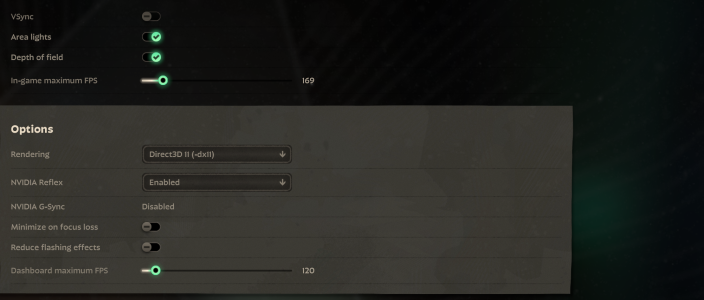
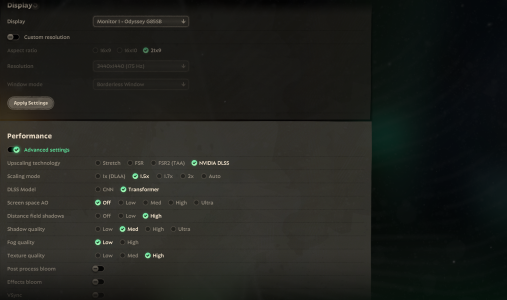
If anyone has had this specifically with Deadlock (nvlddmkm 4101 / VIDEO_SCHEDULER_INTERNAL_ERROR / black screen no signal), I’d appreciate any fixes or Deadlock settings that helped.
 

Attachments

  • Unbenannt.PNG
    Unbenannt.PNG
    1.3 MB · Views: 2
  • Unbenannt.PNG1.PNG
    Unbenannt.PNG1.PNG
    2.7 MB · Views: 2
Since you reinstalled drivers and I hope you did clean reinstall then I suspect your power unit might be at fault.
Is your PSU powerful enough for your hardware?
What are your power mode usage settings?
do you overclock?
For now I think it might problem with PSU or borked GPU, but make sure you clean reinstalled drivers. I don't remember exact steps, so you will need to google how to perform clean reinstall.
 
Issue (only in Deadlock):
My PC crashes while playing Deadlock. Screens go black / “No Signal” and I often have to hard reboot. Sometimes it also BSODs.

What I found in Windows logs:

  • BSOD stop code: VIDEO_SCHEDULER_INTERNAL_ERROR
  • Event Viewer → System:
    • Display Event ID 4101: “Display driver nvlddmkm stopped responding and was recovered.”
    • nvlddmkm Event ID 153 (GPU/driver related, “Error occurred on GPUID …”)
    • After the crash I sometimes see Kernel-Power 41 (hard reboot)
  • I also see DistributedCOM 10016 warnings around the same time, but those are common Windows log spam and don’t seem directly tied to the crash.
Troubleshooting already tried:

  • Reinstalled NVIDIA GPU drivers (issue still happens)
  • Reinstalled Deadlock
  • Installed Deadlock again on a brand new SSD (fresh install location)
  • Checked temps → temps look good
  • Disabled all overlays: Discord Overlay / Steam Overlay / GeForce Experience Overlay / Xbox Game Bar
  • Disabled Hardware-Accelerated GPU Scheduling (HAGS) in Windows:
    Settings → System → Display → Graphics → Default graphics settings → HAGS OFF → reboot
  • Disabled hardware acceleration in Chrome (just in case):
    Chrome → Settings → System → Hardware acceleration OFF → restart
  • MSI Afterburner: disabled “Enable low-level IO driver” and “Enable low-level hardware access”
  • Ran an aggressive full virus/malware scan to rule out background resource usage
PC specs:

  • CPU: AMD Ryzen 5 5600X (6-core, 3.70 GHz)
  • GPU: NVIDIA GeForce RTX 3080 Ti (12 GB)
  • RAM: 32 GB
  • Storage:
    • Samsung 980 PRO with Heatsink 2TB
    • Samsung 990 PRO 2TB (x2)
  • System: Windows 64-bit, x64-based processor
System / Motherboard / BIOS:

  • OS: Windows 10 Home (10.0.19045 / Build 19045)
  • Motherboard: MSI MPG X570S CARBON MAX WIFI (MS-7D52)
  • BIOS: AMI v1.B0 (24.03.2025)
  • Boot mode: UEFI
If anyone has had this specifically with Deadlock (nvlddmkm 4101 / VIDEO_SCHEDULER_INTERNAL_ERROR / black screen no signal), I’d appreciate any fixes or Deadlock settings that helped.
hey! I have the same issue and similar specs (same cpu) my temps *appeared* to be fine, then I checked my card via furmark and the hotspot in my gpu was over 104 C :( my pc is currently being diagnosed so will update on how it goes
 
Back
Top