using xbox controller joystick in the item buy menu unusable by default

zitchaden

Member
to replicate: try using xbox joystick to move around, then try to use the buy menu. The movement joystick is also used for the buy menu cursor!!! And locks your character moving where the joystick cursor (in buy menu) is compared to center of screen.

I like analog movement and mouse in the right hand however cannot currently use this, sad since the analog joystick support in deadlock is so good except for the buy menu.
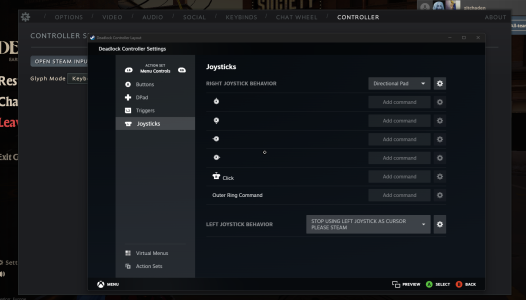
 
HALF-SOLUTION HERE:

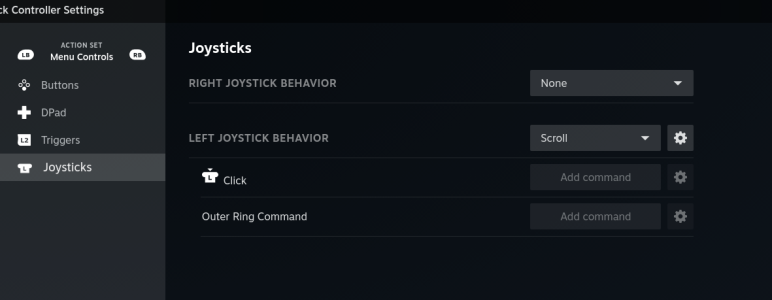
Unbind left joystick menu cursor in Steam Input to something useless. This allows for normal mouse cursor usage. BUT YOU CAN NO LONGER MOVE WHILE IN MENU, AND IF YOU WERE MOVING, YOU WILL CONTINUE IN THAT DIRECTION UNTIL YOU CLOSE THE BUY MENU. GRRRR ME ANGRY

1733633487770.png
 
75% SOLUTION HERE:

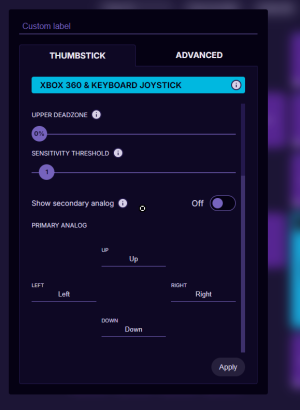
Double bind both analog xbox joystick and regular WASD movement to your analog device (in my case it is an azeron, see screenshot).

This is so when Steam Input disables the xbox joystick movement functionality in the Deadlock buy menu, (for some reason), the regular WASD movement being transmitted simultaneously takes over and you can still move while in the buy menu, although limited to 8 cardinal directions using WASD inputs. But this solves most issues, however it would be nice to maintain analog movement while in buy menu.

volve plz fix.
 

Attachments

  • 1733633901902.png
    1733633901902.png
    63.2 KB · Views: 2
Having analog input fixes one of the roughest problems I'd had with digital movement (I'm using an Azeron keypad + stick), dashing. Hard-locking an 8-way angle has a really weird feel on a WASD-mapped joystick specifically when dashing. However, locking me out of movement while in the buy menu is really disorienting: I often queue up buys during brief windows of downtime while pathing to a shop! So I've actually switched my stick to output WASD instead. (well, ESDF technically, I'm a weirdo in more than one way at once.)

I'd suggest an input tickbox in the Controller options panel: "Joystick and mouse mode," "Disable pointer movement with joystick," or similar. Could have a tooltip reading "Recommended for users who use a joystick and mouse together." It'd just need to turn off joystick pointer control in the buy menu (and spectate for consistency, but that's less important), leaving the stick available to control the player (as it would be when using WASD).
 
Freshly-minted Azeron (Cyborg 2) user here, also wishing that I could still control my movement with the joystick while having the buy menu up (and controlling the cursor with the mouse). Some kind of "Joystick and mouse mode" would be great.

also @nfd re "I'm a weirdo in more than one way at once", I'm coming to the Azeron Cyborg 2 from using RDFG movement keys lol, my pinkie carried a heavy burden (I have stuff bound to Q, W, A, S, shift, Z, and X, with all of those being hit by my pinkie; also my thumb hits V, B, N, M, spacebar, and sometimes even H)
 
Stopped working, then worked again after I made sure the joystick wasn't fully unbound in the shop:
1747487908156.png
Just bind it to an empty thing. If you use `none`, it will completely cut ties with the joystick inputs while in the shop, leading to bugs where the player keeps moving in the same direction despite not even holding the joystick in the shop.
 
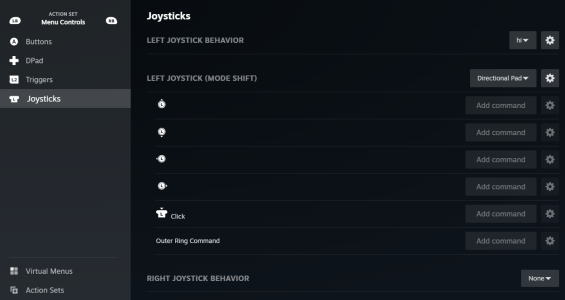
I found a community layout called "azeron deadlock" that fixed the issue for me:Skjermbilde 2026-03-26 094338.png
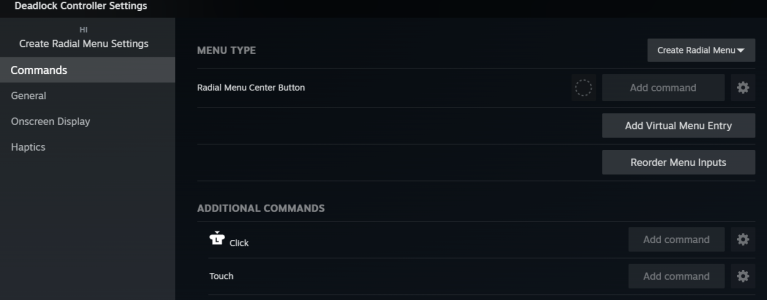
Seems they used a custom radial menu and mode shift for the menu controls left joystick. Dunno how this works, but I can use analog joystick movement while in the shop. (and even in pause menu)
Skjermbilde 2026-03-26 094922.png
Skjermbilde 2026-03-26 094907.png
 
eeehhhh from that screenshot it looks like they make the control stick act as a directional pad which would mean it only allows the same 8 directions allowed by WASD, so you can’t move in more precise angles.
 
Noprimaryfire is my alt account lol! Any of my current profiles should work perfectly without any 8 way limitations for movement in menu. I forgot how I fixed it lol but if it ain't broke.... Something something override controller mode with empty radial menu something something magic. Would've expected this to be fixed by Valve already tho lol @Yoshi pls fix root cause
 
holy wizitch magic 🙏

tangential Azeron remark: i set my thumbstick click action (in the Azeron software) to Toggle Thumbstick and then set my Right Thumbstick (in Steam controller settings) to have 10000°/s sensitivity with 0 vertical sensitivity, so when I click the thumbstick and tilt it to the left or right I spin at 10000°/s, a capability that has made me more popular and attractive. so I recommend it
 
Back
Top