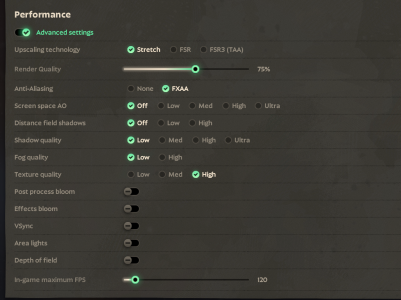
Are you seeing the RAM increases while in a game? Does it happen idling in hideout or sandbox mode? If no, does it happen in a bot match, or just in real games?
Are you using the Vulkan or Direct3D 11 backend? Does changing graphics backends make the stutters and RAM usage better or worse? Can you post a screenshot of your graphics settings?
We're continuing to work on optimizations but narrowing these things down will help us a lot.
@JasperP - Hey i came with the results and more details after tests, this includes detailed infos and videos to help you and also makes things easier i think. Sorry for delay, was meant to do this yesterday.
(note that i mention the word "stutters" but its 50/50 either hitches and stutters, both happens ingame)
I made a summary for instant easy visualization and overall idea but also included medias:
- Vulkan does not fully work for me, it crashes while entering the "Explore NYC"/Real game but does not for Sandbox. Possibly because my GPU is one version older/ too old of GPU. Its think its ok
- Consider that i did not restart my pc between those different tests, its possible that it could be my hardware problem in some way,sometimes after having these issues and closing the game my system looks a bit slow for some time.
- Usually my issue is Stutterings/Hitches: Specially Micro ones, a freeze Ranging from like 0.1s to a 1.5s, this happens pretty much after any action, ranging from: opening: Shop, TAB, ESC, someone used ability, map action such as patron being destroyed, its almost like the asset is being reloaded again the memory, this does not happen immediatelly in the first minutes of the game.
I just tested a fresh game restart, background apps closed (by pressing to turn off pc but spam ESC to cancel), yet i receives those micro stutters, its super unpredictable because some tests it happens after minutes into the game while others only after several minutes. These hitches is also the audio but they usually occur more if i have discord and a clipping software open(medal.tv) and specially if i alt tab too much. This is happening much more after this major update though.
- I played two matches where i recorded Task Manager for RAM usage, ideally i think i shouldnt use recording devices as it could affect the result but i already tried without them and issue still appears as i play more. Not having Recording/Discord still has this stuttering issue but less chance.
- Initially, fresh restart, RAM Hideout usage is about 3.200,0 mb, Training area is around 2.300,0. In match at Lane stage its ~5.000,0mb. At mid game (20min) it might go up to 8.500,0 mb. On game end and back to hideout, it will stay around ~4.300,0mb -- which i guess its fine because things are loaded. However, restarting the game and then playing two matches consecutively, the RAM while in hideout after second match was about 6.100,0 mb-- it could be that more things area loaded in RAM as i played two matches but unsure if really thats intended to stay. See HERE - 1:56:17
- Played three bot match in total, 1 like normal (played lane, bought items, upgraded, made many kills) (17min) and second i went idle for 10min then left, on both the RAM stayed at around 4.000,0. Third is where match lasted for 78minutes. This whole match RAM was at 4.000,0 but one moment went to 5k mb but back to 4kb mb. I still had minor stutters when using an item or shop for example. Minor issues seemly started to appear after i played around (move, buy, kill), micro stutters that increased from just moving around to then also opening Shop causing another micro stutter or using an item.
- Being idle in hideout will not cause issues, possibly just like i went idle for 40minutes in the bot match. It seems i have to actively move around, open UI elements (shop, player), see effects and all.
- Alt-tabbing seems to make this hitches and stutter more comon and worse, possibly because personally my game FPS is reduced to 40 when alt-tabbing, maybe causing some hitch in the game (its on window-no-border mode) (dont know what makes it do that)
- Discord seems to severely affect the performance, specially while a voice chat, example: i was in one with +5 users. Restarting game and then joining a custom match map will almost immediatelly starts perceiving micro stutters/freezes, which becomes worse much faster as the game goes, although i also had recording on, as oposse to have it closed and receive less common stutters. Maybe because it consumes a lot in total for 16gb RAM, although i have seen a report about discord causing issues to deadlock (HERE) and another but for CSGO.
There is a post above me in this thread that mentions about looking at Mid causing FPS issues (
Another thread),
in my tests where i was already in the huge stutters stage, if i were to look around middle/patron, i would receive a Stutter every single time (Here - 1:51:16
).
There is a Pause bug where Shop glitches and creates multiple duplicate of its effect, causing almost everyone to receive 1 fps (
Post1) (
Post2) (
Post3).. while thats not common (Pretty sure happened to me once in this major), its possible that in some way this Object or Effects is being doubled as the game goes despite no pauses. Could be looked at too
78minutes bot match:
Might be useful to see RAM usage and notice pattern of stutter after an action.
I also made some notes of some stutters/freeze in description
Two Bot match
this includes fewer stutters and hitches, its all quick. Listed two, Basically it means it will happen in bot match.
Two Real Match | Possibly more important
at around 18:22 in the video, RAM from 5k mb starts to go to almost 9k mb at 9minutes of game after fresh game restart, no stutters yet i think. Not sure if normal.
At around 1:56:43 i start doing tests in other modes and its noticeable the game is consuming 2x RAM, worse than restart game
Discord party issue despite restarting game each round. Restart just before this match. I have a second monitor and discord in the side and sometimes i did alttab in it.
I also made two PerfView but they are for the full match and contains a huge amount of data which i think have to do properly later.
There are some recent threads about FPS issues too but doesnt seem like exactly mine issue, will share here for visibility for more details just in case.
Post
Thanks
---
Edited to fix a youtube link