
DeadlockerBenReporting
Member
ISSUE:
Controller (8bitdo Ultimate 2 Wireless, Switch Pro Controller, DualSense) will not respond on startup with the new update, it will only respond when connecting when the game is already running.
OS: Windows 11
Steam Beta Client 23/01/2026 (25/02/2026 beta as well)
STEPS:
1. Start Deadlock with a controller already connected to Steam. (Sony DualSense shows frequent success rate compared to every other controller so test with a different controller such as Nintendo Switch Pro, 8bitdo Ultimate 2 Wireless in Dinput or Bluetooth mode, Official Xbox Controller)
2. Try to press an input to confirm title screen.
3. You'll experience that only holding Start will enter the game but no other buttons will work and prompts are missing.
RESULTS:
Deadlock will not respond with the controller, only KBM
EXPECTED:
Deadlock to work when launching with a controller connected using the recommended Layouts provided by Valve.
TEMPORARY SOLUTION:
Connect your controller after the game has launched and the title screen shows, doing this will then enable the controller to respond to all the inputs correctly.
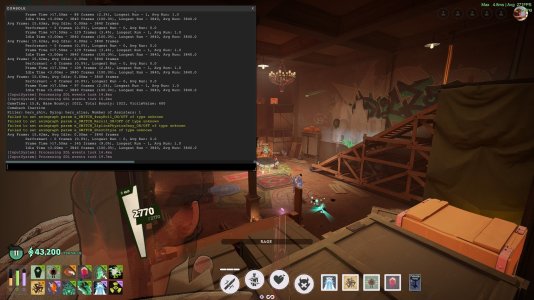
If you connect your controller before the game launches the in-game Console will show that it detects an SDL event in the [Input System] but button prompts dissapear and no controls work except the holding your controllers designated "Start/Pause" button which will bring up the Escape menu.
Thank you.
Controller (8bitdo Ultimate 2 Wireless, Switch Pro Controller, DualSense) will not respond on startup with the new update, it will only respond when connecting when the game is already running.
OS: Windows 11
Steam Beta Client 23/01/2026 (25/02/2026 beta as well)
STEPS:
1. Start Deadlock with a controller already connected to Steam. (Sony DualSense shows frequent success rate compared to every other controller so test with a different controller such as Nintendo Switch Pro, 8bitdo Ultimate 2 Wireless in Dinput or Bluetooth mode, Official Xbox Controller)
2. Try to press an input to confirm title screen.
3. You'll experience that only holding Start will enter the game but no other buttons will work and prompts are missing.
RESULTS:
Deadlock will not respond with the controller, only KBM
EXPECTED:
Deadlock to work when launching with a controller connected using the recommended Layouts provided by Valve.
TEMPORARY SOLUTION:
Connect your controller after the game has launched and the title screen shows, doing this will then enable the controller to respond to all the inputs correctly.
If you connect your controller before the game launches the in-game Console will show that it detects an SDL event in the [Input System] but button prompts dissapear and no controls work except the holding your controllers designated "Start/Pause" button which will bring up the Escape menu.
Thank you.
Attachments
Last edited:

