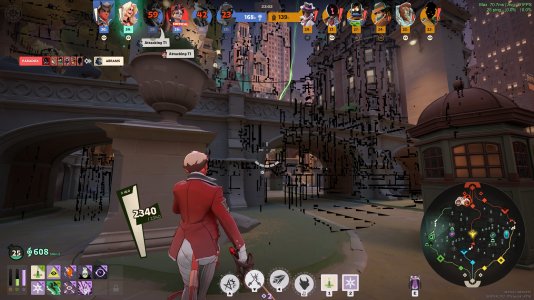
So recently i've been having this really strange bug that I'm not too sure what is causing it. It causes strange black geometry to appear frequently on the screen, typically outlining different objects.
To start, I'm running on a Ryzen 7 7800 X3D, and an ASUS TUF RTX 5070.
Messing with settings, this is what I know about this bug.
1. It happens on every graphics setting, and lowering the graphics settings doesn't lower the frequency of the bug. The exception seems to be when I lower every graphics setting. I've messed with different settings to try to narrow one down that could be the issue but to no avail, if everything isn't on the lowest setting the black geometry comes back.
2. It only happens when rendering with DX11, if I render with vulkan it doesn't happen at all (seperate issue with vulkan though, it causes frame drops that genuinely make this bug more managable to play with.
3. Depending on the upscale model used changes how bad the bug is (mostly the size of the strange black geometry) DLSS defintiely makes the bug the worst it can be, and FSR2 seems to tone it down the most.
4. It happens in the lobby too, but only when you start matchmaking. If I don't start a match it doesn't happen.
5. It happens even in bot matches
6. It seems to appear more frequently around different particle affects, most notably The curiosity shop light on the floor, the matchmaking table, and seven's ball. (it doesn't cause the geometry to appear there, but when they are on screen it causes the geometry to appear in general.
7. Deleting the shaders and clearing the cache changes the severity of the bug, sometimes it makes it wose, sometimes it makes it better, it never completely removes it. (This is the most interesting bit in my opinion, I initially thought my PC was compiling the shaders with DX11 too quickly and corrupting some of them so I slowed my CPU and GPU clock down but that didn't seem to have any noticable results.
My best guess as to what is happening is that when the shaders initally download with DX11, some of them get corrupted and then this causes the black geometry to appear around what I can only guess are the hitboxes of objects in the world. The strange thing here is that the upscaling model has the biggest affect (and really the only real affect) on the severity of the bug once the shaders are done. Idk why this could be the case, but i'm not very well versed in upscaling models. Unfortunately I know that it's possible this could be a driver issue. I stopped playing deadlock for a few months, and in that time both the game and my graphics driver updated so it is possible that it could be either a game bug or a driver issue. I did backdate my graphics driver to the one I used when this bug didn't happen and it hasn't fixed anything so I think its a bug from in game.
Has anyone else experienced this or found a good fix for it yet? I haven't seen anything online about it and I've been searching for a while. I appreciate any help you guys can offer!
Final note: I posted about this on reddit a few weeks back, and everyone came to the consensus that it was a hardware issue. From what I've gathered and my knowlede of GPU's and CPU's it is highly unlikely, almost impossible even, for this to be a hardware issue. I've 100% ruled out that possiblity. I also don't experience anything like this in onther games so unfortunately this is all I have to go off of.
Thank you to anyone who has any input! Even if you aren't sure of anything I would greatly appreciate any ideas.
To start, I'm running on a Ryzen 7 7800 X3D, and an ASUS TUF RTX 5070.
Messing with settings, this is what I know about this bug.
1. It happens on every graphics setting, and lowering the graphics settings doesn't lower the frequency of the bug. The exception seems to be when I lower every graphics setting. I've messed with different settings to try to narrow one down that could be the issue but to no avail, if everything isn't on the lowest setting the black geometry comes back.
2. It only happens when rendering with DX11, if I render with vulkan it doesn't happen at all (seperate issue with vulkan though, it causes frame drops that genuinely make this bug more managable to play with.
3. Depending on the upscale model used changes how bad the bug is (mostly the size of the strange black geometry) DLSS defintiely makes the bug the worst it can be, and FSR2 seems to tone it down the most.
4. It happens in the lobby too, but only when you start matchmaking. If I don't start a match it doesn't happen.
5. It happens even in bot matches
6. It seems to appear more frequently around different particle affects, most notably The curiosity shop light on the floor, the matchmaking table, and seven's ball. (it doesn't cause the geometry to appear there, but when they are on screen it causes the geometry to appear in general.
7. Deleting the shaders and clearing the cache changes the severity of the bug, sometimes it makes it wose, sometimes it makes it better, it never completely removes it. (This is the most interesting bit in my opinion, I initially thought my PC was compiling the shaders with DX11 too quickly and corrupting some of them so I slowed my CPU and GPU clock down but that didn't seem to have any noticable results.
My best guess as to what is happening is that when the shaders initally download with DX11, some of them get corrupted and then this causes the black geometry to appear around what I can only guess are the hitboxes of objects in the world. The strange thing here is that the upscaling model has the biggest affect (and really the only real affect) on the severity of the bug once the shaders are done. Idk why this could be the case, but i'm not very well versed in upscaling models. Unfortunately I know that it's possible this could be a driver issue. I stopped playing deadlock for a few months, and in that time both the game and my graphics driver updated so it is possible that it could be either a game bug or a driver issue. I did backdate my graphics driver to the one I used when this bug didn't happen and it hasn't fixed anything so I think its a bug from in game.
Has anyone else experienced this or found a good fix for it yet? I haven't seen anything online about it and I've been searching for a while. I appreciate any help you guys can offer!
Final note: I posted about this on reddit a few weeks back, and everyone came to the consensus that it was a hardware issue. From what I've gathered and my knowlede of GPU's and CPU's it is highly unlikely, almost impossible even, for this to be a hardware issue. I've 100% ruled out that possiblity. I also don't experience anything like this in onther games so unfortunately this is all I have to go off of.
Thank you to anyone who has any input! Even if you aren't sure of anything I would greatly appreciate any ideas.