HarryPropper
New member
Hey everyone, I’ve been unable to play Deadlock for months due to severe lag, jitter, and ping spikes (often jumping to ~100 ms), despite a stable internet connection and extensive local troubleshooting.
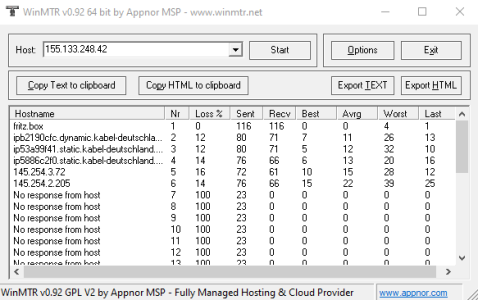
After proper network diagnostics, the root cause is not the game client, not my PC, and not my local network. The issue is packet loss and jitter occurring inside the ISP backbone on the route to Valve’s Steam Datagram Routing (SDR).
Summary of findings
- Local network (Router / PC): OK
0% packet loss on hop 1 (router)
Stable low latency
Packet loss starts inside ISP network
12–16% packet loss observed on multiple ISP backbone hops
Increasing worst-case latency (jitter spikes)
Target server
Deadlock server IP: 155.133.248.42 (Valve / Steam Datagram)
Traceroute alone looks “fine”
Because ICMP is filtered on many hops
WinMTR over time clearly shows the problem
Sustained packet loss before reaching Valve’s network
This explains:
- Rubberbanding
- Unstable ping
What have i tried:
- Reinstalling Deadlock
- Reinstalling Steam
- Reinstalling Windows
- Changing Steam download region
- Port forwarding
- Router resets
- Graphic or in-game settings
This is a routing problem between certain ISPs and Valve’s Steam Datagram Routing, not a client-side or hardware issue.
If anyone has the same problem or knows anything about it, please get in touch. Unfortunately, Deadlock has become unplayable in the last 6 months and I just wish I could play a few rounds again.
Thank you for your time
After proper network diagnostics, the root cause is not the game client, not my PC, and not my local network. The issue is packet loss and jitter occurring inside the ISP backbone on the route to Valve’s Steam Datagram Routing (SDR).
Summary of findings
- Local network (Router / PC): OK
0% packet loss on hop 1 (router)
Stable low latency
Packet loss starts inside ISP network
12–16% packet loss observed on multiple ISP backbone hops
Increasing worst-case latency (jitter spikes)
Target server
Deadlock server IP: 155.133.248.42 (Valve / Steam Datagram)
Traceroute alone looks “fine”
Because ICMP is filtered on many hops
WinMTR over time clearly shows the problem
Sustained packet loss before reaching Valve’s network
This explains:
- Rubberbanding
- Unstable ping
What have i tried:
- Reinstalling Deadlock
- Reinstalling Steam
- Reinstalling Windows
- Changing Steam download region
- Port forwarding
- Router resets
- Graphic or in-game settings
This is a routing problem between certain ISPs and Valve’s Steam Datagram Routing, not a client-side or hardware issue.
If anyone has the same problem or knows anything about it, please get in touch. Unfortunately, Deadlock has become unplayable in the last 6 months and I just wish I could play a few rounds again.
Thank you for your time