Performance issues

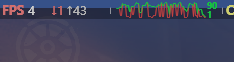
This. I want to enjoy this patch, but my overall performance took a massive hit. I can no longer hold anything above 90 FPS; constant dips to less than 50 FPS when I previously held over 144FPS. Team fights look like a buffering video, and opening the leaderboard causes my game to freeze for a second.
 
Ok so I think they started using DLSS 4.5 which despite looking nicer, takes a heavy hit on performance for older RTX cards. If yall wanna give it a try, this has improved my frame rate and makes gameplay feel smoother.

open the NVIDIA App, on the sidebar, Graphics > Deadlock, under Driver Settings > DLSS Override - Model Presets > Custom > Super Resolution > Preset F.

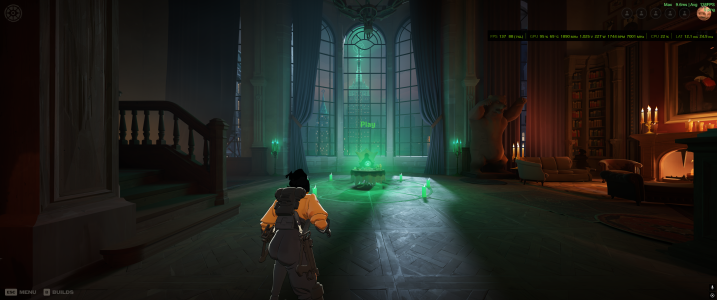
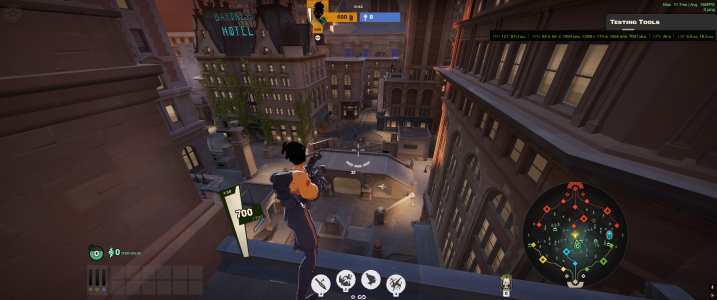
This is without any changes:
Use_3D_Hideout.pngUse_3D_Explore.png

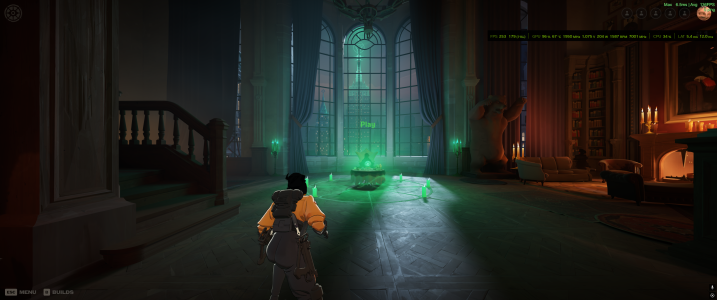
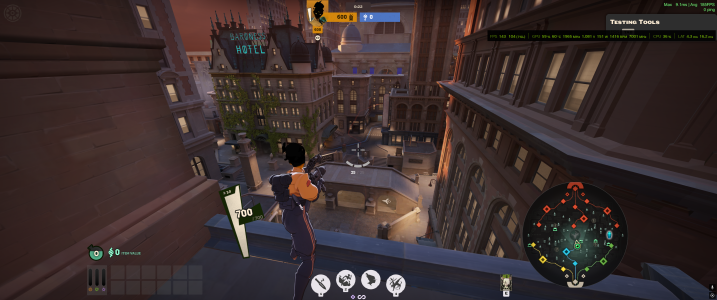
And this is with Preset F selected:
Preset_F_Hideout.pngPreset_F_Explore.png


Hopefully this helps some of you.
 
Ok so I think they started using DLSS 4.5 which despite looking nicer, takes a heavy hit on performance for older RTX cards. If yall wanna give it a try, this has improved my frame rate and makes gameplay feel smoother.

open the NVIDIA App, on the sidebar, Graphics > Deadlock, under Driver Settings > DLSS Override - Model Presets > Custom > Super Resolution > Preset F.

This is without any changes:
View attachment 76542View attachment 76541

And this is with Preset F selected:
View attachment 76543View attachment 76544


Hopefully this helps some of you.
Thanks for the hint, I'm playing on Transformer/Quality and I think preset K should be the right one for me. Preset K is the "old" DLSS 4.0 Transformer preset. Preset F should be the default preset for Ultra Performance and DLAA modes.

I already tested the new DLSS 4.5 in the previous update when it was still in beta. Due to poor performance and noticeably worse FPS, I switched back to the DLSS 4 model again. So it makes sense that there might be issues now if they updated it in the latest patch.

If you also check the NVNGX_DLSS.DLL, you can see that it’s currently version 310.5.0.0, which is the latest DLSS 4.5 release.
 
Last edited:
Middle of the map:
Being in or looking towards the blue lane instantly visibly reduces your framerate.

UI Issues
Certain UI elements being on screen causes obvious FPS drops. Characters saying voice lines, Opening the tab menu, Kills appearing on the killfeed. These all cause the game to begin to lag
Seconding this bug report with similar issues. Anything besides being on a side lane and looking towards the outside of the map brings me down to 5-10 fps. I am on a laptop with no nvidia.
I didn't notice additional lag due to UI issues.

Match ID: 51601443 I assume the replay won't show the lag, but you can at least see the areas I was staying in and where I was looking.
 
Thanks for the hint, I'm playing on Transformer/Quality and I think preset K should be the right one for me. Preset K is the "old" DLSS 4.0 Transformer preset. Preset F should be the default preset for Ultra Performance and DLAA modes.

I already tested the new DLSS 4.5 in the previous update when it was still in beta. Due to poor performance and noticeably worse FPS, I switched back to the DLSS 4 model again. So it makes sense that there might be issues now if they updated it in the latest patch.

If you also check the NVNGX_DLSS.DLL, you can see that it’s currently version 310.5.0.0, which is the latest DLSS 4.5 release.
Thank you, you're right. K is good. I originally tested both J/K, but forgot I had DLAA on instead of DLSS so I was getting less FPS. I changed it to DLSS, then closed the game and swapped to Preset F so it looked like it was performing better. Also nice, I didn't even think to check the dll.
 
Seconding this bug report with similar issues. Anything besides being on a side lane and looking towards the outside of the map brings me down to 5-10 fps. I am on a laptop with no nvidia.
I didn't notice additional lag due to UI issues.

Match ID: 51601443 I assume the replay won't show the lag, but you can at least see the areas I was staying in and where I was looking.
Same exact thing, only in bot matches the game has a few moments where it seems to run smooth regardless of camera direction for like 1-2 mins and then goes back to 10fps, exploring the map runs without problems.
I did notice that tab reduced my fps (when i had more than 10) on the first time but nothing else.
 
Update: The bug went away for part of a game, then came back. I made a separate thread for that occurrence.

 
Having the same problem. 4070 with Intel Ultra 9. Prior to the patch, I was averaging 200 fps in-game, whereas after the patch my system is struggling to average 60. Other games completely unaffected.
In the lobby I still get 150-250fps, but as soon as I load into the main map it immediately tanks to ~50fps.
 
For people experiencing stutters:
I started force closing the game with task manager as soon as matchmaking finds a game. I then open the game and rejoin as soon as the button to rejoin the game appears. (skipping pre compile shader cache shenanigans and whatever the game loads on the hub)

Minimal stutters, game is playable again
Not sure if this is placebo and the stutters are mostly gone because of todays mini-patch, but i will keep doing it since its working.

give that a try
force close game with task manager when matchmaking finds a match, open game and rejoin as soon as possible
 
For people experiencing stutters:
I started force closing the game with task manager as soon as matchmaking finds a game. I then open the game and rejoin as soon as the button to rejoin the game appears. (skipping pre compile shader cache shenanigans and whatever the game loads on the hub)

Minimal stutters, game is playable again
Not sure if this is placebo and the stutters are mostly gone because of todays mini-patch, but i will keep doing it since its working.

give that a try
force close game with task manager when matchmaking finds a match, open game and rejoin as soon as possible
I tried this method, the first time it didn't work and the second two times i didn't get the option to rejoin. hopefully those aren't counted as me leaving games; anyone else who tries this method be aware that might happen.
 
I got a performance issue too, with major frame drops not just in blue lane, but practically every lane. It seems that looking from the Hidden King's side to Arch Mother causes the most frame issues, but Arch Mother to Hidden King is mostly stable. It may have to do with the additional tunnels added under the map.
 
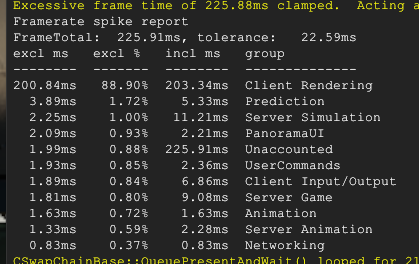
Can any of you open up the console and see if this message pops up? I want to see if anyone has the same results (This MIGHT help narrow it down, I THINK. Not sure if this helps... or if the developers can even do anything about it...)

deadlock_5EYRnOjJ6J.png
 
Thanks for the hint, I'm playing on Transformer/Quality and I think preset K should be the right one for me. Preset K is the "old" DLSS 4.0 Transformer preset. Preset F should be the default preset for Ultra Performance and DLAA modes.

I already tested the new DLSS 4.5 in the previous update when it was still in beta. Due to poor performance and noticeably worse FPS, I switched back to the DLSS 4 model again. So it makes sense that there might be issues now if they updated it in the latest patch.

If you also check the NVNGX_DLSS.DLL, you can see that it’s currently version 310.5.0.0, which is the latest DLSS 4.5 release
Ok so I think they started using DLSS 4.5 which despite looking nicer, takes a heavy hit on performance for older RTX cards. If yall wanna give it a try, this has improved my frame rate and makes gameplay feel smoother.

open the NVIDIA App, on the sidebar, Graphics > Deadlock, under Driver Settings > DLSS Override - Model Presets > Custom > Super Resolution > Preset F.

This is without any changes:
View attachment 76542View attachment 76541

And this is with Preset F selected:
View attachment 76543View attachment 76544


Hopefully this helps some of you.
unfortunately im still getting the same issue with preset K enabled
 
Can any of you open up the console and see if this message pops up? I want to see if anyone has the same results (This MIGHT help narrow it down, I THINK. Not sure if this helps... or if the developers can even do anything about it...)

View attachment 78759
When I'm facing away from the center and not experiencing the lag, I can see that in the console. When I'm lagging, the console spams "[Client] server acknowledged to slot 9 client only predicted into 6 slots, full repredict will occur" at an incredible pace. It will do one pair (eg. 9, 6) of numbers for ~10 messages and then change to a new pair of numbers.
 
Back
Top