

posties
New member
Hey everyone,
I'm posties; new to the forums, but i've been playing the game since mid 2025. I know that this forum category may be specifically for Item changes, but i don't see a better place to suggest this so i'm putting it here.
PREFACE: If you came here to read this and complain about how auto-queuing builds "is trash" or affects your mentality and feelings, this isn't the thread for that. This feature can be completely ignored by your playstyle, and won't affect your direct gameplay.
On the other hand, it will help new players understand the basics of changing their item choices during a game, like when to get a defense/heal item, or what movement item to get based on the opposite composition; generally helping the team out by not just following a Lightbringer guide from L>R.
Flex Pick Category
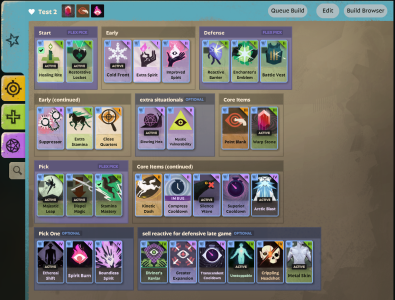
I’m proposing a new category type called Flex Pick. This feature bridges the gap between a locked-in build and manual shopping, allowing players to pre-plan situational choices and execute them instantly in-game.
1. The "Flex Pick" Toggle
In the Build Editor, a new checkbox is added to the Category Options.
When selected:
That's my spiel; I'd love to hear others thoughts on this!
I'm posties; new to the forums, but i've been playing the game since mid 2025. I know that this forum category may be specifically for Item changes, but i don't see a better place to suggest this so i'm putting it here.
PREFACE: If you came here to read this and complain about how auto-queuing builds "is trash" or affects your mentality and feelings, this isn't the thread for that. This feature can be completely ignored by your playstyle, and won't affect your direct gameplay.
On the other hand, it will help new players understand the basics of changing their item choices during a game, like when to get a defense/heal item, or what movement item to get based on the opposite composition; generally helping the team out by not just following a Lightbringer guide from L>R.
Flex Pick Category
I’m proposing a new category type called Flex Pick. This feature bridges the gap between a locked-in build and manual shopping, allowing players to pre-plan situational choices and execute them instantly in-game.
The Concept
The Flex Pick category allows you to group 2-4 items together (e.g., Healing Rite vs. Restorative Locket). Instead of the build system picking one for you or skipping them entirely (like "Optional" categories do), it triggers a quick-choice prompt.How It Works
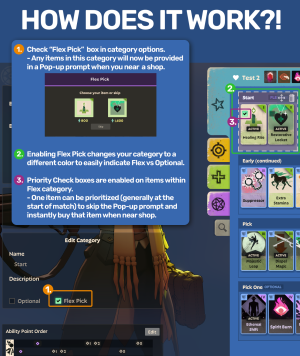
1. The "Flex Pick" Toggle
In the Build Editor, a new checkbox is added to the Category Options.
When selected:
- The category box takes on a unique hue (to distinguish it from Standard and Optional categories).
- Priority Checkboxes appear on the top-left of every item within that category.
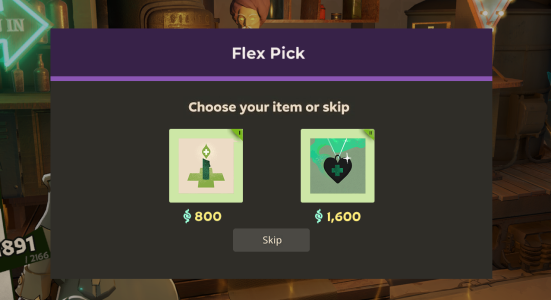
- A small Pop-up Prompt appears (see attached Mockup above).
- You can click the item you need or hit "Skip." This eliminates the need to open the full shop menu and navigate tabs mid-fight or during a rotation.
- Once a priority item is set, the Pop-up is bypassed.
- The system treats that item as your "Core" for that specific match, auto-buying it the moment you enter shop range.
Why This Matters
- For New Players: It acts as a guide. Instead of being overwhelmed by the whole shop, the game says: "Hey, you need a heal item. Pick one of these two." It teaches situational itemization without the "analysis paralysis."
- For Competitive/Pro Players: It’s all about efficiency. Being able to look at the enemy team comp during the loading screen, "Priority Check" your counters (like Suppressor or Silence Wave), and never having to manually search for them again saves significant time over the course of a match.
That's my spiel; I'd love to hear others thoughts on this!


