[Linux/General] Compatibility & Crashes

Nxt

New member
Hey everyone,

I’m starting a general thread for Linux users playing Deadlock to compare experiences and try to identify common issues.

Sorry if this comes off a bit frustrated, but I’ve been having a pretty rough time with it lately. I’ve been running the game through Proton/Wine and keep hitting random crashes, occasional freezes, and even some file integrity issues.

I’m trying to figure out whether this is something on my end or if others are running into similar problems.

If you’ve experienced anything like this, I’d really appreciate hearing:
  • What distro and kernel you’re using.
  • What Proton/Wine version you’re running.
  • What seems to trigger the issue (if anything).
  • Any fixes or workarounds you’ve tried that helped.
Even just knowing I’m not the only one dealing with this would help a lot & I could try to recreate some of those stuff.

Remember, Do not copy paste commands but some of you seem new to Linux so here are some basics list of commands you can use to gather more info. )
lspci, lscpu, uname -r


Template (feel free to copy/paste/remove):

Distro/Kernel Version:
GPU + Driver:
CPU:
Proton/Wine Version:
Game Version/Build (if known):


Issues Experienced:
When it happens:
Workarounds tried:
Logs / Errors / Messages:


Thanks in advance 🙏
 
Last edited:
Distro/Kernel Version: NixOS + CachyOS kernel 6.19.X + KDE plasma, all latest versions
GPU + Driver: 9070XT + latest mesa
CPU: 9800X3D
Proton/Wine Version: Proton-GE / Proton-CachyOS latest
Game Version/Build (if known): all builds from 2 months ago till today

Issues Experienced: random crashes during matches, sometimes requiring reboot, sometimes crashing to the desktop.
When it happens: from 1 time every 2 games to 3 times in a single game, usually happens when something occurs like pressing a spell or getting punched, but it's seemingly random what action triggers it.
i have no idea how to replicate the crashes, seems totally random and sometimes happens like 2 minutes apart, while sometimes I can play 2 games without crashing and join the third one and get 3 crashes in 25 minutes even playing the same hero.
Workarounds tried: changing multiple graphics settings
dx11 and vulkan
multiple proton versions (GE, cachy, hotfix, experimental)
update everything as soon as it is available (drivers, kernel, proton, etc)
nothing seems to make any difference
Logs / Errors / Messages: random proton crash when returning to desktop, did not look on the system logs on reboot
 
  • Like
Reactions: Nxt
Distro/Kernel Version: Any
GPU + Driver: Any
CPU: Any
Proton/Wine Version: Any
Game Version/Build (if known): Any

Issues Experienced:
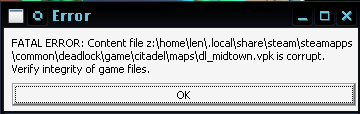
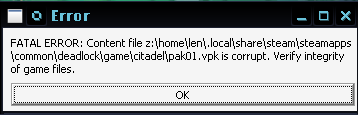
Client crashes, corrupt file errors, game files integrity loss, Fps drops.
Logs / Errors / Messages (Some):
Screenshot_20260404_020053.pngScreenshot_20260404_074052.png

Premise:

During troubleshooting, I found that these issues can sometimes be caused by faulty or unstable RAM, rather than the game itself.

If your RAM is unstable (bad sectors, failing sticks, or unstable XMP/overclock, CPU unable to manage 4 ram sticks etc.), it can lead to these severity's.

This is not specific to Source 2. Two games can both use 16GB of RAM but behave very differently, so the issue may never appear for a user despite underlying hardware problems (as in my case).

After fixing my RAM issues (I had 2 bad sectors),
I’ve had zero crashes (So far. )

Prerequisite:
Before trying other fixes, test your RAM:
Run MemTest86+ (recommended) or an equivalent tool

Solution:
If prerequisite apply, multiple options is offered to you.
  1. Check RAM Stability (XMP / Overclocking):
    Unstable memory settings are a very common cause of crashes, even if the RAM itself is not defective.
    • Disable XMP/DOCP/EXPO in BIOS and test at default speeds
    • If stability improves, your previous settings were likely unstable
    • Try:
      • Lowering frequency ( from 3600 → 3200 MHz)
      • Increasing voltage slightly (advanced users only)
      • Updating your BIOS for better memory compatibility
  2. Verify RAM Compatibility
    Not all RAM kits work perfectly with all motherboards/CPUs.
    • Check your motherboard’s QVL (Qualified Vendor List)
    • Mixing different RAM kits (even same brand/model) can cause instability
    • Ensure:
      • Matching speeds and timings
      • Proper dual-channel configuration
  3. Replace Faulty Ram
    • Carefully test each stick individually with memtest86+,
    • Follow your motherboard manual for correct slot configuration
    • If one stick in a matched pair is faulty, replacing the pair is often safer
  4. Workarounds (Not Guaranteed)
    • Blacklist bad memory regions ( Effectiveness varies and may not fully resolve instability )
    • If available force ram usage limit with steam launch options.
Note: Check your warranty, Many RAM kits come with lifetime warranties or long-term (5–10+ years) coverage. You may be eligible for a replacement.​
 
Last edited:
Hello, since the Old Gods New Blood update I've been experiencing some crashes that haven't stopped. The problem is that I'm not sure if it's related to the game because I replaced my PC fan about 3 months before this happened. I also don't know how to help the developers understand what's going on. Generally, my PC freezes if I play 3 consecutive matches (standard mode), and when it crashes I simply have to manually restart by pressing the PC buttons. I simply can't log anything to track the crashes, and I couldn't anyway because the match keeps running and I need to return to it. Do you have any method for logging crashes?

Thank you very much for the thread.
 
I forgot to mention the thread I created here, where I describe the problem and my specifications.


In thah thread one thing I noticed is that it's not something related to Holiday.
 
following the clues pointing to these crashes and freezes being RAM issues, I tried lowering my RAM frequency from 6000MT/s to 5800MT/s and since doing it, the crashes have stopped.

even though there are reports of people disabling XMP/EXPO completely, for me a simple 200MT/s drop was enough.
 
Back
Top