Lag/Memory leak after one match

bubbablue9

New member
Not sure how else to provide useful information, but whenever I open the game and play a match, its completely fine, no issues. Problems begin once I start a second match without restarting my game. Only then will there be a 0.5 to 1 second freeze every time I open the shop, buy an item, hit tab, or get a kill/die. From then on there will be random stuttering that will become more and more apparent through the rest of the match, and at some point I am forced to restart my game either mid match or once it is done.
Specs:
Processor - 12th Gen Intel(R) Core(TM) i7-12700K 3.61 GHz
Installed RAM - 32.0 GB
Graphics Card - NVIDIA GeForce RTX 3080 (10 GB)
System Type - 64-bit operating system, x64-based processor
Windows 10
Running deadlock with DirectX 11
 
I have this exact same issue running Vulkan on Linux via Proton. I also have a 12th gen Intel CPU, but I have an AMD GPU (6700xt).

Someone in a game said that disabling the Discord overlay fixed it for them, but I'm not running any such overlays.
 
Since you also have a 12th gen Intel processor, I just tried pinning the game to only the P-cores of my processor (0-15) and that didn't seem to help.

I'm also playing the game on minimum settings.
 
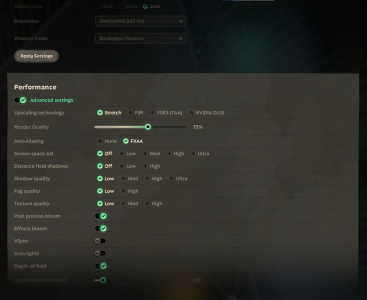
I using 2060 super (8 gb) with Ryzen 7 2700 also 30gb of RAM

With this settings can play in 3+ games without any lags in them (but fighting with Yamato or Celest... it drops :D)

1771753632932.png
 
Since you also have a 12th gen Intel processor, I just tried pinning the game to only the P-cores of my processor (0-15) and that didn't seem to help.

I'm also playing the game on minimum settings.
Im on Ryzen 7 7700x and have same problem. The thing is CPU is totally fine and loaded about 45-50%, but my RTX 3060Ti is choking on 99% load and going down to 0% in freezes. I cant believe my GPU is so bad that it cant run a Source engine
 
Same here, it's especially infuriating that it makes me waste my ultimate while trying to level them up.
Ryzen 5600X
48gb ram
RTX 3070 8gb
windows 11
dx11
 
Using CachyOS (Wayland) and dx11 rendering. Had to disable "allow background processing of vulkan shaders" in steam's downloads settings to get rid of this issue. I'm not sure if windows has this option though and I'm running it with an rtx 5070
 
Back
Top