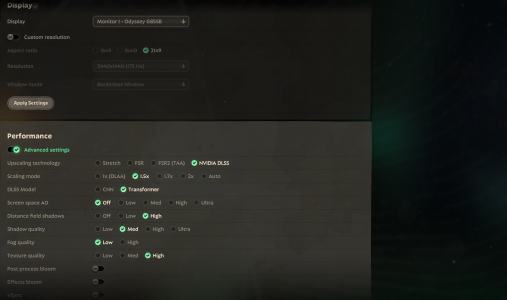
I spent 12 hours on my computer to fix crashing issues with this game. Please help me with my ban and low prio queue

Slindyyy

New member
I am new to this forum, but briefly looking over it, I am seeing that many other players are experiencing the same issues as me. This was never an issue to me in the past, but now whenever I join a game, my game crashes and I receive a queue ban. I've spent 12+ hours trying to fix this issue involving my graphics card, game cache, coding, etc. I would really appreciate it if a mod can lift my play ban or atleast provide any details if they plan to fix this bug. Attached to this post is a writeup of some of the changes I completed on my computer.

Hello,

I’m experiencing consistent crashes/freezes in Deadlock while using an NVIDIA RTX 2060. Here are the details:

- **GPU:** NVIDIA RTX 2060
- My driver has been fully updated, crashes still occured, and I went back to old driver
- **Windows 11
- **Game version:** Steam DX11 build (Engine.ini override applied)

**Problem:**
- Game freezes in lobby/menu after shaders start compiling.
- Audio continues but the screen is frozen.
- Event Viewer shows:
- Source: nvlddmkm
- Event ID: 0
- First in-game movement can cause noticeable lag or FPS drops.

**Steps I’ve already tried:**
1. Forced DX11 using Engine.ini:
[/Script/Deadlock.DeadlockGameEngine]
bUseDX12=False
bForceDX11=True

2. Deleted all Steam + NVIDIA shader caches.
3. Adjusted NVIDIA settings:
- Shader Cache Size = Unlimited
- Power Management = Maximum Performance
- Threaded Optimization = ON
- Low Latency Mode = OFF
- V-Sync = OFF
4. Steam launch option: `-fps_max 60`
5. Windowed Borderless mode for stability monitoring.
6. DDU and reinstall
7. Windows registry check

**Additional notes:**
- Menus are choppy initially due to shader compilation.
- FPS stabilizes (~55–60) after ~10–15 minutes in the menu.
- Freeze often happens when moving in the lobby or first entering a match.

**Logs / Attachments:**
- Event Viewer nvlddmkm crash logs
- DXDiag


I’m looking for guidance on how to prevent these freezes during lobby/menu shader compilation. Is there anything else I should do? Did I go overboard? Can a mod please remove my bans and queue punishment? Any help would be appreciated!

Thank you.
 
I'm also having trouble joining the updated map and its matches, maybe we could be having the same files problem, something is definitely corrupt, and maybe we will have to wait for a hotfix ;-;
Do try "map dl_midtown" in your console to see if it worked for you instead of you getting banned again.
 
Happened to me again today too but steam always get stuck downloading or verifying at 0%. It takes so long restarting my computer and steam to have it let me get back into the game that it always results in a ban at this point.
 
I am new to this forum, but briefly looking over it, I am seeing that many other players are experiencing the same issues as me. This was never an issue to me in the past, but now whenever I join a game, my game crashes and I receive a queue ban. I've spent 12+ hours trying to fix this issue involving my graphics card, game cache, coding, etc. I would really appreciate it if a mod can lift my play ban or atleast provide any details if they plan to fix this bug. Attached to this post is a writeup of some of the changes I completed on my computer.

Hello,

I’m experiencing consistent crashes/freezes in Deadlock while using an NVIDIA RTX 2060. Here are the details:

- **GPU:** NVIDIA RTX 2060
- My driver has been fully updated, crashes still occured, and I went back to old driver
- **Windows 11
- **Game version:** Steam DX11 build (Engine.ini override applied)

**Problem:**
- Game freezes in lobby/menu after shaders start compiling.
- Audio continues but the screen is frozen.
- Event Viewer shows:
- Source: nvlddmkm
- Event ID: 0
- First in-game movement can cause noticeable lag or FPS drops.

**Steps I’ve already tried:**
1. Forced DX11 using Engine.ini:
[/Script/Deadlock.DeadlockGameEngine]
bUseDX12=False
bForceDX11=True

2. Deleted all Steam + NVIDIA shader caches.
3. Adjusted NVIDIA settings:
- Shader Cache Size = Unlimited
- Power Management = Maximum Performance
- Threaded Optimization = ON
- Low Latency Mode = OFF
- V-Sync = OFF
4. Steam launch option: `-fps_max 60`
5. Windowed Borderless mode for stability monitoring.
6. DDU and reinstall
7. Windows registry check

**Additional notes:**
- Menus are choppy initially due to shader compilation.
- FPS stabilizes (~55–60) after ~10–15 minutes in the menu.
- Freeze often happens when moving in the lobby or first entering a match.

**Logs / Attachments:**
- Event Viewer nvlddmkm crash logs
- DXDiag


I’m looking for guidance on how to prevent these freezes during lobby/menu shader compilation. Is there anything else I should do? Did I go overboard? Can a mod please remove my bans and queue punishment? Any help would be appreciated!

Thank you.


Same problem here.

Issue (only in Deadlock):
My PC crashes while playing Deadlock. Screens go black / “No Signal” and I often have to hard reboot. Sometimes it also BSODs.

What I found in Windows logs:

  • BSOD stop code: VIDEO_SCHEDULER_INTERNAL_ERROR
  • Event Viewer → System:
    • Display Event ID 4101: “Display driver nvlddmkm stopped responding and was recovered.”
    • nvlddmkm Event ID 153 (GPU/driver related, “Error occurred on GPUID …”)
    • After the crash I sometimes see Kernel-Power 41 (hard reboot)
  • I also see DistributedCOM 10016 warnings around the same time, but those are common Windows log spam and don’t seem directly tied to the crash.
Troubleshooting already tried:

  • Reinstalled NVIDIA GPU drivers (issue still happens)
  • Reinstalled Deadlock
  • Installed Deadlock again on a brand new SSD (fresh install location)
  • Checked temps → temps look good
  • Disabled all overlays: Discord Overlay / Steam Overlay / GeForce Experience Overlay / Xbox Game Bar
  • Disabled Hardware-Accelerated GPU Scheduling (HAGS) in Windows:
    Settings → System → Display → Graphics → Default graphics settings → HAGS OFF → reboot
  • Disabled hardware acceleration in Chrome (just in case):
    Chrome → Settings → System → Hardware acceleration OFF → restart
  • MSI Afterburner: disabled “Enable low-level IO driver” and “Enable low-level hardware access”
  • Ran an aggressive full virus/malware scan to rule out background resource usage
PC specs:

  • CPU: AMD Ryzen 5 5600X (6-core, 3.70 GHz)
  • GPU: NVIDIA GeForce RTX 3080 Ti (12 GB)
  • RAM: 32 GB
  • Storage:
    • Samsung 980 PRO with Heatsink 2TB
    • Samsung 990 PRO 2TB (x2)
  • System: Windows 64-bit, x64-based processor
System / Motherboard / BIOS:

  • OS: Windows 10 Home (10.0.19045 / Build 19045)
  • Motherboard: MSI MPG X570S CARBON MAX WIFI (MS-7D52)
  • BIOS: AMI v1.B0 (24.03.2025)
  • Boot mode: UEFI
If anyone has had this specifically with Deadlock (nvlddmkm 4101 / VIDEO_SCHEDULER_INTERNAL_ERROR / black screen no signal), I’d appreciate any fixes or Deadlock settings that helped.
 

Attachments

  • 1771078818795.png
    1771078818795.png
    2.7 MB · Views: 0
Same problem here.

Issue (only in Deadlock):
My PC crashes while playing Deadlock. Screens go black / “No Signal” and I often have to hard reboot. Sometimes it also BSODs.

What I found in Windows logs:

  • BSOD stop code: VIDEO_SCHEDULER_INTERNAL_ERROR
  • Event Viewer → System:
    • Display Event ID 4101: “Display driver nvlddmkm stopped responding and was recovered.”
    • nvlddmkm Event ID 153 (GPU/driver related, “Error occurred on GPUID …”)
    • After the crash I sometimes see Kernel-Power 41 (hard reboot)
  • I also see DistributedCOM 10016 warnings around the same time, but those are common Windows log spam and don’t seem directly tied to the crash.
Troubleshooting already tried:

  • Reinstalled NVIDIA GPU drivers (issue still happens)
  • Reinstalled Deadlock
  • Installed Deadlock again on a brand new SSD (fresh install location)
  • Checked temps → temps look good
  • Disabled all overlays: Discord Overlay / Steam Overlay / GeForce Experience Overlay / Xbox Game Bar
  • Disabled Hardware-Accelerated GPU Scheduling (HAGS) in Windows:
    Settings → System → Display → Graphics → Default graphics settings → HAGS OFF → reboot
  • Disabled hardware acceleration in Chrome (just in case):
    Chrome → Settings → System → Hardware acceleration OFF → restart
  • MSI Afterburner: disabled “Enable low-level IO driver” and “Enable low-level hardware access”
  • Ran an aggressive full virus/malware scan to rule out background resource usage
PC specs:

  • CPU: AMD Ryzen 5 5600X (6-core, 3.70 GHz)
  • GPU: NVIDIA GeForce RTX 3080 Ti (12 GB)
  • RAM: 32 GB
  • Storage:
    • Samsung 980 PRO with Heatsink 2TB
    • Samsung 990 PRO 2TB (x2)
  • System: Windows 64-bit, x64-based processor
System / Motherboard / BIOS:

  • OS: Windows 10 Home (10.0.19045 / Build 19045)
  • Motherboard: MSI MPG X570S CARBON MAX WIFI (MS-7D52)
  • BIOS: AMI v1.B0 (24.03.2025)
  • Boot mode: UEFI
If anyone has had this specifically with Deadlock (nvlddmkm 4101 / VIDEO_SCHEDULER_INTERNAL_ERROR / black screen no signal), I’d appreciate any fixes or Deadlock settings that helped.
For your RAM, is it 2 or 4 sticks? I have 32gb as well but the of the sticks are slightly different. All my ram sticks are 8GB but two are at 2133 mhz and two are 2300 by default, but I lower them all the 2133 to be in sync. Wondering if Deadlock specifically does not like this because all the other system intensive games I play are fine with this setup.
 
For your RAM, is it 2 or 4 sticks? I have 32gb as well but the of the sticks are slightly different. All my ram sticks are 8GB but two are at 2133 mhz and two are 2300 by default, but I lower them all the 2133 to be in sync. Wondering if Deadlock specifically does not like this because all the other system intensive games I play are fine with this setup.
I have 4 all the same.I think my problem is resolved... make sure you have GAME READY driver for nvidia and not STUDIO... they just made an update that seems to have resolved my problem.
 
I am new to this forum, but briefly looking over it, I am seeing that many other players are experiencing the same issues as me. This was never an issue to me in the past, but now whenever I join a game, my game crashes and I receive a queue ban. I've spent 12+ hours trying to fix this issue involving my graphics card, game cache, coding, etc. I would really appreciate it if a mod can lift my play ban or atleast provide any details if they plan to fix this bug. Attached to this post is a writeup of some of the changes I completed on my computer.

Hello,

I’m experiencing consistent crashes/freezes in Deadlock while using an NVIDIA RTX 2060. Here are the details:

- **GPU:** NVIDIA RTX 2060
- My driver has been fully updated, crashes still occured, and I went back to old driver
- **Windows 11
- **Game version:** Steam DX11 build (Engine.ini override applied)

**Problem:**
- Game freezes in lobby/menu after shaders start compiling.
- Audio continues but the screen is frozen.
- Event Viewer shows:
- Source: nvlddmkm
- Event ID: 0
- First in-game movement can cause noticeable lag or FPS drops.

**Steps I’ve already tried:**
1. Forced DX11 using Engine.ini:
[/Script/Deadlock.DeadlockGameEngine]
bUseDX12=False
bForceDX11=True

2. Deleted all Steam + NVIDIA shader caches.
3. Adjusted NVIDIA settings:
- Shader Cache Size = Unlimited
- Power Management = Maximum Performance
- Threaded Optimization = ON
- Low Latency Mode = OFF
- V-Sync = OFF
4. Steam launch option: `-fps_max 60`
5. Windowed Borderless mode for stability monitoring.
6. DDU and reinstall
7. Windows registry check

**Additional notes:**
- Menus are choppy initially due to shader compilation.
- FPS stabilizes (~55–60) after ~10–15 minutes in the menu.
- Freeze often happens when moving in the lobby or first entering a match.

**Logs / Attachments:**
- Event Viewer nvlddmkm crash logs
- DXDiag


I’m looking for guidance on how to prevent these freezes during lobby/menu shader compilation. Is there anything else I should do? Did I go overboard? Can a mod please remove my bans and queue punishment? Any help would be appreciated!

Thank you.
Make sure you have GAME READY driver for nvidia and not STUDIO... they just made an update that seems to have resolved the same problem.
 
Make sure you have GAME READY driver for nvidia and not STUDIO... they just made an update that seems to have resolved the same problem.
Well it's good to know it's not a ram issue like that then. But I have had game ready drivers installed the entire time. Never had studio
 
I have 4 all the same.I think my problem is resolved... make sure you have GAME READY driver for nvidia and not STUDIO... they just made an update that seems to have resolved my problem.
I think you are right. Still, where can we seek help regarding game bans? I dont deserve to suffer in low-prio queue
 
Back
Top