Game freeze/crashing

Dezzy

Member
Specs.

CPU: i7-13700F
GPU: RX 9070 XT

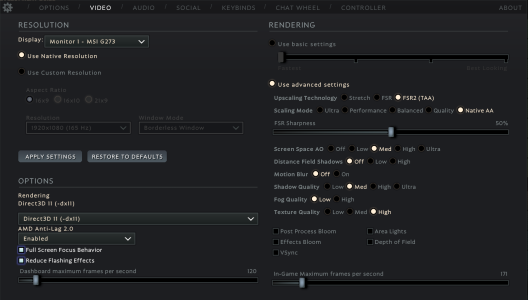
Game will stutter/freeze then crash if too much input is happening or too many instances of player created objects like Geist bomb or turrets while game is frozen, not sure if anyone else is experiencing this but wanted to share just incase. in-game settings also in post.
 

Attachments

  • image_2026-01-14_203401211.png
    image_2026-01-14_203401211.png
    156.2 KB · Views: 2
I've noticed that Split Shot + Lucky Shot + high fire rate, even worse with other visual effects like mercurial and ricochet will drop my FPS a ton, which is a strategy some vypers purposefully try to abuse, but from the looks of it your GPU/CPU should probably be able to handle it if they're working properly.

I would recommend making sure your GPU drivers are updated and that your computer isn't bottlenecking in some way, as stutters/freezing can be linked to that. You can use Radeon's performance tracking feature in the Radeon-provided software, or even just task manager if you have a second monitor (Click the "More details" button and just look at the CPU/Memory/Disk/GPU columns).

Also, how much RAM do you have? In task manager it shows as "Memory" and in my experience when my games start to stutter/freeze it's typically because of high Memory or GPU usage. Chrome/Firefox/browsers in general tend to use a lot of Memory.
 
I've noticed that Split Shot + Lucky Shot + high fire rate, even worse with other visual effects like mercurial and ricochet will drop my FPS a ton, which is a strategy some vypers purposefully try to abuse, but from the looks of it your GPU/CPU should probably be able to handle it if they're working properly.

I would recommend making sure your GPU drivers are updated and that your computer isn't bottlenecking in some way, as stutters/freezing can be linked to that. You can use Radeon's performance tracking feature in the Radeon-provided software, or even just task manager if you have a second monitor (Click the "More details" button and just look at the CPU/Memory/Disk/GPU columns).

Also, how much RAM do you have? In task manager it shows as "Memory" and in my experience when my games start to stutter/freeze it's typically because of high Memory or GPU usage. Chrome/Firefox/browsers in general tend to use a lot of Memory.
I currently have 32 of RAM ive never had the problem before its just recently. it makes me think its a faulty windows update (spaghetti coding) per usual. my cpu doesnt bottle neck that hard as i dont try to run my games on max everything. i also just have opera gx and discord open
 
I currently have 32 of RAM ive never had the problem before its just recently. it makes me think its a faulty windows update (spaghetti coding) per usual. my cpu doesnt bottle neck that hard as i dont try to run my games on max everything. i also just have opera gx and discord open
What about your GPU drivers? You need to keep it updated on the radeon software because having out of date drivers can lead to the types of issues you're experiencing.

Also probably unrelated, but if you're running out of space on your storage drives, it can also lead to issues like that.
 
What about your GPU drivers? You need to keep it updated on the radeon software because having out of date drivers can lead to the types of issues you're experiencing.

Also probably unrelated, but if you're running out of space on your storage drives, it can also lead to issues like that.
true that has been an issue im seeing recently ill try to clean up my drives a bit and update, i know sometimes newer gpu stuff can cause some issues also
 
Back
Top