

meowmories
New member
Logged onto this game this morning and decided to try out a new character, but everytime I click to look at the list of public builds, I get this popup.
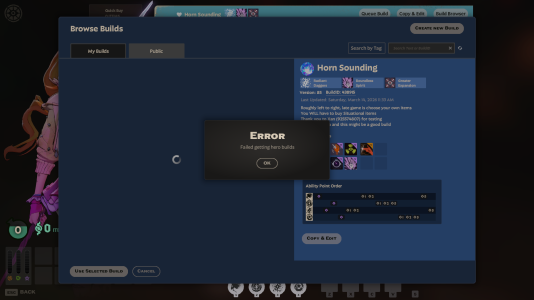
I've tried disabling my mods, verifying the integrity of the files, reinstalling the game, deleting my cloud save, logging out of steam, and nothing seems to be working.
My only working theory is that when I was away from home last night, I tried Steam Link for the first time which let me access my Steam client through my phone - I didn't open any games but I did notice that the client seemed to be different after exiting Big Picture Mode. (I couldn't access the store or the community page through Steam Link on my phone.)
Other than that, I have no other ideas on how this could have happened. I mess around with in-game commands a lot but I didn't this morning, all I did was hop into a solo Bot Match to try out Paige for the first time - That's when I went to go look for a build and I got this error.
If anyone has any ideas, please let me know! Looking forward to trying out new characters and it will certainly be more challenging if I couldn't use this. Thank you!
I've tried disabling my mods, verifying the integrity of the files, reinstalling the game, deleting my cloud save, logging out of steam, and nothing seems to be working.
My only working theory is that when I was away from home last night, I tried Steam Link for the first time which let me access my Steam client through my phone - I didn't open any games but I did notice that the client seemed to be different after exiting Big Picture Mode. (I couldn't access the store or the community page through Steam Link on my phone.)
Other than that, I have no other ideas on how this could have happened. I mess around with in-game commands a lot but I didn't this morning, all I did was hop into a solo Bot Match to try out Paige for the first time - That's when I went to go look for a build and I got this error.
If anyone has any ideas, please let me know!
Looking forward to trying out new characters and it will certainly be more challenging if I couldn't use this. Thank you!

