Deadlock.exe hangs after removal of 3.5mm audio plug from jack - Reproducible

wolfwarg

New member
Deadlock.exe hangs after removal of 3.5mm plug from motherboard back panel audio jack - Reproducible

Steps To Reproduce:
1) Ensure microphone is plugged into 3.5mm mic jack at the back of motherboard, then launch Deadlock.
2) Whilst in lobby (hideout, no games pending) enter the Settings menu -> Audio -> Voice (settings as listed below) -> Confirm that the reactive mic input bar is picking up noise.
3) Disconnect 3.5mm plug from microphone jack.

Outcome: Deadlock hangs indefinitely and displays "Deadlock (Not Responding)" as the window name in the applications' top bar. Requires force shutdown and relaunch to resolve.

Steam client:
- Steam Beta Branch: Stable Client
- Steam Version: 1769025840
- Steam Client Build Date: Thu, Jan 22 6:13 AM UTC -08:00
- Steam API Version: SteamClient023

Deadlock Game versions:
- App ID: 1422450
- Build ID: 22256521

Deadlock Voice Settings (Default)
-> Settings -> Audio -> Voice
- Input Device: Default Device
- Voice level: Bar indicates audio input is being picked up
- Mic triggered threshold (0%)
- Listen to my mic, Streamlined mic, Open mic (team and party): All off

Windows version:
- Windows 10 Pro version 22H2 (OS Build 19045.6937)

PC Specs:
- Motherboard Steel Legend B450m
- AMD Ryzen 5 3600
- NVIDIA RTX 3090 (Driver 821.08 DHC)
- 80GB RAM

Microphone:
- Generic boom mic connected directly to motherboard mic input via 3.5mm jack across stereo audio cable
- High Definition Audio Device Controller Driver: Microsoft ver 10.0.1904.6926

I cannot find relevant crash logs sorry.

I hope that's useful for bug hunting. Thank you for this amazing game :)
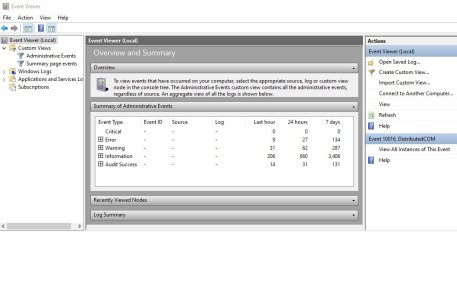
 
I know this is probably a useless question, but are you sure this isn't a driver issue? Check event viewer for errors when you remove the audio jack.

Thanks heaps for the suggestion.
Not sure if I'm looking in the right place, but here's my Event Viewer screen after PC Boot-Up once all the events have settled down.
I then launched Steam and Deadlock, and repeated the STR per my post above, and the crash happened again.
After refreshing, there was no change in the number of events (i.e. 'Error', 'Warning', 'Information', 'Audit Success') in the 'Last hour' column after the crash.
Is there somewhere else I should be looking maybe?

deadlock_audio_jack_crash_EventViewer.jpg

Since no-one else has responded saying that they can replicate the issue, I figured that it must be some esoteric thing with my specific hardware setup. It's not a big deal really. I just know to avoid unplugging my audio cable while playing Deadlock. Easy fix :)

I did search before posting, and recall finding a post (or two?) about people having crashes for unknown reasons, and they noted thinking it happens when their arm hits the audio cable from their headset. I thought maybe this was the same issue I'd found (triggered when their jack was 'wiggled' in the port by the tension on the cable), and that perhaps if Valve found and fixed an issue with how they handle audio disruptions, then it would stop lots of people having 'mystery' crashes for which this cause would be hard to pin down. But since it seems so rare, it's probably not a big deal.

I guess I do have an unusual set up though. Running an extension 3.5mm stereo audio cable from my PC audio jack to a plug in mic (detachable mic from an old broken Audeze Penrose headset).

PC <----->Extension Cable<--->Mic
|
|
F M▬▬▬▬▬▬▬▬▬F M====🎤
|
|

A couple of crazy things to note are:
- When I unplug the mic from the extension cable end, the crash DOESN'T occur (it only happens when I unplug the extension cable from the PC jack point. Even without a mic plugged in at the other end).
- When I unplug the mic from the extension cable, Deadlock's voice meter still registered a flickering noise signal at about half max volume even though the actual mic is unplugged. However when I then unplug the extension cable from the PC jack point, the Deadlock voice meter drops off completely, indicating no audio signal.

So perhaps it's just the extension cable itself somehow causing electrical noise, and maybe a short circuit of some kind when I pull the male pin out of the jack point at the PC? But the crash only occurs with Deadlock. Other applications like Discord have no issues.

I have no idea what's going on lol.
 
Last edited:
---
Me think this is driver-conflict thing considering your motherboard is (also) using the audio-thing from "Realtek"
( very problematic company in overall to many audio enthusiasts, me included;
had to migrate to (AMD) DisplayPort-audio to re-access "Loudness Equalization" and many other useful audio enhancements ).

At least, if this your motherboard in question:
https://www.asrock.com/mb/amd/b450m steel legend/

Also being on now deprecated Windows 10 could also be an culprit in this problem:
At the very least I personally was not able to reproduce this crash of yours on my Windows 11-setup in which I use generic "High Definition Audio Device"-drivers (by Microsoft?) rather than the ones from Realtek
( or at least, I have nothing in my machine mentioning Realtek; no registry, no device, nada ).
---
 
---
Me think this is driver-conflict thing considering your motherboard is (also) using the audio-thing from "Realtek"
( very problematic company in overall to many audio enthusiasts, me included;
had to migrate to (AMD) DisplayPort-audio to re-access "Loudness Equalization" and many other useful audio enhancements ).

At least, if this your motherboard in question:
https://www.asrock.com/mb/amd/b450m steel legend/

Also being on now deprecated Windows 10 could also be an culprit in this problem:
At the very least I personally was not able to reproduce this crash of yours on my Windows 11-setup in which I use generic "High Definition Audio Device"-drivers (by Microsoft?) rather than the ones from Realtek
( or at least, I have nothing in my machine mentioning Realtek; no registry, no device, nada ).
---
Thanks for your reply.

That's a couple of votes now for audio drivers, so I'll dig into that and see what comes of it.

Sounds like it's just me experiencing this though, and on a deprecated OS as you say. So it's safe to retire this thread I think.

Thank you to everyone for your help :)
 
Back
Top