
AshtonTankGallistel
New member
Hello, I'm having a ton of issues regarding crashes in the past 2 weeks. My game ran relatively smoothly on this computer for the past year or so, with no notable crashes until the past few months. Even then, they were relatively rare until the past 2 weeks, when I returned to my home computer after being out of town for about a month. During this time frame, I've had the game crash in nearly every single match that I've been in, sometimes upwards of 4-5 times. There's no discernible connection between any of the crashes; sometimes it'll be during a heavy firefight, other times I'll be just getting onto a zipline with no other players nearby. I've also began to experience crashes on startup, those these only occur when attempting to reconnect to a match post-crash, as well as 2 crashes when beginning to queue for a match. Most concerningly, I have experienced 2 separate bluescreens within the past two weeks. (I've experienced a blue screen from the game once before, but it was months ago and relatively isolated from other crashes.)
The game runs completely fine outside of these crashes; I've updated my computer and my Nvidia drivers to the most recent version, which had no notable affect. I've also attempted to solve it by both verifying my game files, and uninstalling/reinstalling the game, neither of which worked. My most recent match, done right after the reinstall, had 5 crashes, 6 if you count an additional startup crash that occured after the fourth. (ID is 50843939)
My system info is:

Is there anything I can do? Is there any way I can check what's causing the crashes, like crash logs?
EDIT:
I've since found out from another thread how to view crash logs! Taking a look at them, the vast majority seem to be due to access violations, where "The thread tried to read from or write to a virtual address for which it does not have the appropriate access." I don't know how or why the game would attempt to read from/write to an invalid address though, nor how to prevent it from doing so...
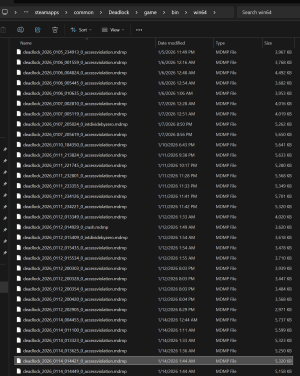
Blueshift also mentioned a way to check crash logs for blue screens, which I will make sure to do next time I get one. ty Blueshift!
EDIT 2:
Updating as I am no longer having the issue, and others seem to still be having it. I was unable to find the exact issue, but I think I found the indirect cause. I realized that around the same time I had been playing another game that was also unstable (modded Minecraft, specifically a corrupted GTNH save), and after I stopped playing that game, Deadlock functioned with no crashes whatsoever! That said, I'm unsure what exact issue was caused by the other game that could have possibly been affecting Deadlock. My best recommendation for anyone having this issue is to restart your computer, and try playing this game WITHOUT playing another game first, and see if you have better performance.
EDIT 3:
Hello from several months in the future, sadly the issue has returned for me. While the above did help for a bit, crashes did eventually return, regardless of whether I restart my computer or not. Don't know what else can be done, but it's possible that frequent playing of corrupted/buggy programs may mess with deadlock's stability, with restarts only mildly helping. Or I may be completely wrong! Sorry if this doesn't help much, best of luck to everyone else.
The game runs completely fine outside of these crashes; I've updated my computer and my Nvidia drivers to the most recent version, which had no notable affect. I've also attempted to solve it by both verifying my game files, and uninstalling/reinstalling the game, neither of which worked. My most recent match, done right after the reinstall, had 5 crashes, 6 if you count an additional startup crash that occured after the fourth. (ID is 50843939)
My system info is:
Is there anything I can do? Is there any way I can check what's causing the crashes, like crash logs?
EDIT:
I've since found out from another thread how to view crash logs! Taking a look at them, the vast majority seem to be due to access violations, where "The thread tried to read from or write to a virtual address for which it does not have the appropriate access." I don't know how or why the game would attempt to read from/write to an invalid address though, nor how to prevent it from doing so...
Blueshift also mentioned a way to check crash logs for blue screens, which I will make sure to do next time I get one. ty Blueshift!
EDIT 2:
Updating as I am no longer having the issue, and others seem to still be having it. I was unable to find the exact issue, but I think I found the indirect cause. I realized that around the same time I had been playing another game that was also unstable (modded Minecraft, specifically a corrupted GTNH save), and after I stopped playing that game, Deadlock functioned with no crashes whatsoever! That said, I'm unsure what exact issue was caused by the other game that could have possibly been affecting Deadlock. My best recommendation for anyone having this issue is to restart your computer, and try playing this game WITHOUT playing another game first, and see if you have better performance.
EDIT 3:
Hello from several months in the future, sadly the issue has returned for me. While the above did help for a bit, crashes did eventually return, regardless of whether I restart my computer or not. Don't know what else can be done, but it's possible that frequent playing of corrupted/buggy programs may mess with deadlock's stability, with restarts only mildly helping. Or I may be completely wrong! Sorry if this doesn't help much, best of luck to everyone else.
Last edited:

