Bizzare audio glitching/slowing (EDIT: FOUND A FIX)

♥ SillySnark ♥

Active member
This has been happening since way way WAYYYY before the big update. Sometimes it used to happen randomly whilst I was in the menu or booting up the game.

But occasionally it happens mid game and it makes the game absolutely awful to play. It will stay like this once it's happened. Restarting the game doesn't fix it and I have to restart my whole PC.

This is the only game or program where this happens. This audio bug is only in-game and doesn't carry over anywhere else. I have absolutely no idea what causes it.

Match ID where I caught it happen: 40032916
(around 34 mins in)
See clip below (apologies for mic audio)

View attachment Deadlock - 2025-08-28 18-00-22.mp4
 
Last edited:
ok so bump/update

ive got it to be replicated where if i disconnect from a discord call OR someone in a call with me disconnects it bugs out the audio. that's the only thing i can figure out that triggers it, but i can swear it's happened randomly other times too.
 
Last edited:
bumping this again. still happens. most consistently when i disconnect from a discord call (literally every time in this case).

i KNOW its probably some sort of audio driver issue, but i don't know how to fix it nor do i have any idea why it only happens on Deadlock and NO OTHER game.
 
OK I'VE HAD HELP AND I'VE FIGURED OUT THE PROBLEM!!

Discord changed the sample rate of your audio device when you leave/join calls. Somehow this messes up Deadlock's audio causing lag/bugging/glitching/stuttering/slowing etc. Idk if anything else causes this too, but if this happens, this should fix it.

To fix if this happens to you:
1. Search sound on your Windows start menu
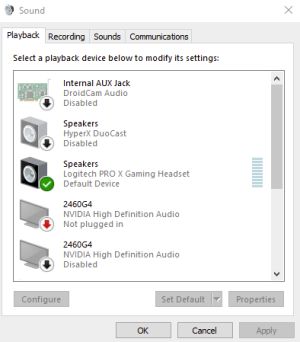
2. Click "change system sounds" (or whatever pops up for you to get to this sound menu):
1766155488230.png
(yours will probably look different).

3. Go to your speakers/headphones/whatever your default audio device is, right click and go to properties -> advanced.
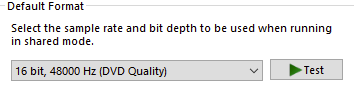
4. CHANGE THIS!!! 1766155635174.png
I've noticed Discord sets it to 44100 so I just switch it back to 48000. BUT if you know what you usually use just literally change it and change it back to whichever and it should fix the audio!
- IF your audio disappears just restart the game. It beats restarting the entire PC.

It seems like I'm the only person ever who has had this issue. But you never know, maybe in the future if this still happens when the game releases to everyone someone else might have this problem. I feel like the ancient tradition of sharing your wisdom or fixes on forums needs to be upheld lmfao.

thanks for reading this schizo post where i'm the only one talking LOL
 
Back
Top