"Manjaro Linux" (64 bit)
Kernel Name: Linux
Kernel Version: 6.9.3-3-MANJARO
X Server Vendor: The X.Org Foundation
X Server Release: 12401000
X Window Manager: KWin
Steam Runtime Version: <Runtime disabled>
Video Card:
Driver: Intel Mesa Intel(R) Arc(tm) A770 Graphics (DG2)
Driver Version: 4.6 (Compatibility Profile) Mesa 24.0.9-manjaro1.1
OpenGL Version: 4.6
Desktop Color Depth: 24 bits per pixel
Monitor Refresh Rate: 164 Hz
VendorID: 0x8086
DeviceID: 0x56a0
Revision Not Detected
Number of Monitors: 2
Number of Logical Video Cards: 1
Primary Display Resolution: 1920 x 1080
Desktop Resolution: 3840 x 1080
Primary Display Size: 20.87" x 11.81" (23.98" diag), 53.0cm x 30.0cm (60.9cm diag)
Primary VRAM Not Detected
Sound card:
Audio device: Loopback Mixer
Memory:
RAM: 32025 Mb
VR Hardware:
VR Headset: None detected
Miscellaneous:
UI Language: English
LANG: en_US.UTF-8
Total Hard Disk Space Available: 127931 MB
Largest Free Hard Disk Block: 21983 MB
Storage:
Number of SSDs: 2
SSD sizes: 1000G,1000G
Number of HDDs: 0
Number of removable drives: 0
Compare Your HardwareClose
please read the thread. we are on linux
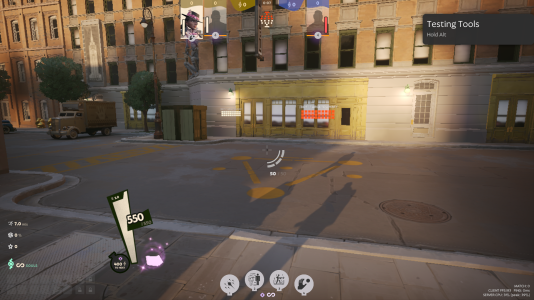
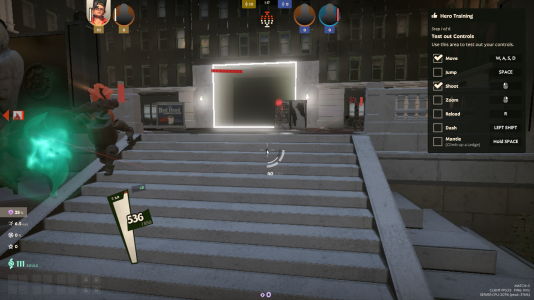
the character occasionally becomes visible in specific circumstances, like when the camera gets extremely close to them, or when on this side of that gateway thing.
this is on DX11, vulkan does not seem to load
Oh, yes, the ARC video card can really give out such jokes. The game is currently in beta, so a lot of things may not work
Try to follow the steps described in another thread, and you can continue the dialog there
I wrote about this in a different thread since a lot of people seem to have issues with the graphical rendering pipeline integration of the vulkan renderer. So what you have to do is.
Step 1. Downgrade to version 415.68 nvidia drivers, if youre an amd you will need to fetch the latest patches from the kernel repository around 2023 at october since the newer linux kernel drivers are kinda messed up because of amd.
Step 2. If you are on kde you have to uninstall the compositor and compile the latest one from here https://github.com/KDE/kwin.
I would recommend to build with -O3 for...
Good news/update, I guess. With the game being public now, someone finally filed a Mesa Linux driver report and it seems like Intel engineers will try and look into the issues from their side starting Monday.
Good news/update, I guess. With the game being public now, someone finally filed a Mesa Linux driver report and it seems like Intel engineers will try and look into the issues from their side starting Monday.
It seems that the merge request is submitted, but it needs "manual action". Is there an option to somehow persuade people in charge to take a look at the merge request?
At this point, there was no action for more than a week, so i decided to fix the issue myself.
Note that I'm using arch, so some package names can differ depending on your distro.
Open the console and clone into the mesa repository using git (install git if you don't have it):
This will create a new directory in ~ folder (your home folder). Go in there with:
Bash:
cd mesa
Now, you need to get the changes with the code 31042 that fix the bug. This is how you do it:
Bash:
git fetch origin merge-requests/31042/head
This might not be necessary, but just in case it helps, change the branch to something other than main, like deadlock-branch:
Bash:
git checkout -b deadlock-branch
Git gave me an error for the next command because my name wasn't set. I've set it to spkry with:
Bash:
git config --global user.name "spkry"
Now, the fetch command put all the changes into the FETCH_HEAD, but now we have to merge it with:
Bash:
git merge FETCH_HEAD
Now, you'll have to compile mesa. This will take some time and CPU power, it took me less than 10 minutes with Ryzen 5600G.
Before that, you need to install some packages that will be necessary to compile. For me these were:
Meson will give you errors and tell you which libraries are missing if you're still missing some. Search on the internet to find out which packages provide those libraries.
Now, these commands will compile mesa into your chosen directory, for simplicity this will be ~/mesa/install. Though the full path must be used, per mesa documentation. Change [username] to your own username, of course.
Do note that these directories and the name of the icd file depend on your platform, maybe. For me, while mesa documentation says the directory should be lib64, it was lib. Since we all have a problem with intel, then we use the file that's in share/vulkan/icd.d/intel_icd.x86_64.json. I tried intel_hasvk_icd.x86_64.json, but it didn't launch.
Now the game should work, though it did crash for me when using -vulkan renderer, so make sure to use -dx11.
Here's mesa documentation if you want to verify:
At this point, there was no action for more than a week, so i decided to fix the issue myself.
Note that I'm using arch, so some package names can differ depending on your distro.
Open the console and clone into the mesa repository using git (install git if you don't have it):
This will create a new directory in ~ folder (your home folder). Go in there with:
Bash:
cd mesa
Now, you need to get the changes with the code 31042 that fix the bug. This is how you do it:
Bash:
git fetch origin merge-requests/31042/head
This might not be necessary, but just in case it helps, change the branch to something other than main, like deadlock-branch:
Bash:
git checkout -b deadlock-branch
Git gave me an error for the next command because my name wasn't set. I've set it to spkry with:
Bash:
git config --global user.name "spkry"
Now, the fetch command put all the changes into the FETCH_HEAD, but now we have to merge it with:
Bash:
git merge FETCH_HEAD
Now, you'll have to compile mesa. This will take some time and CPU power, it took me less than 10 minutes with Ryzen 5600G.
Before that, you need to install some packages that will be necessary to compile. For me these were:
Meson will give you errors and tell you which libraries are missing if you're still missing some. Search on the internet to find out which packages provide those libraries.
Now, these commands will compile mesa into your chosen directory, for simplicity this will be ~/mesa/install. Though the full path must be used, per mesa documentation. Change [username] to your own username, of course.
Do note that these directories and the name of the icd file depend on your platform, maybe. For me, while mesa documentation says the directory should be lib64, it was lib. Since we all have a problem with intel, then we use the file that's in share/vulkan/icd.d/intel_icd.x86_64.json. I tried intel_hasvk_icd.x86_64.json, but it didn't launch.
Now the game should work, though it did crash for me when using -vulkan renderer, so make sure to use -dx11.
Here's mesa documentation if you want to verify:
you should be able to run vulkan with PROTON_HIDE_NVIDIA_GPU=0 PROTON_ENABLE_NVAPI=1
it doesn't run as well as dx11 though
edit:
for me it was
LD_LIBRARY_PATH="/home/cake/mesa/install/lib64" VK_DRIVER_FILES="/home/cake/mesa/install/share/vulkan/icd.d/intel_icd.x86_64.json" %command%
it does seem to work
It's in Mesa 24.3 which should be releasing around November as the stable quarterly release and probably farther out if you have a Linux distro that isn't using the most up to date packages or not using a git version of Mesa. The main issue now really is focusing on performance, because it really stinks right now, I can't play the game without dips into the single digit FPS in team fights and the crashes with the shop is annoying too and this was happening before the current FPS issues.