Game crashes multiple times per game

superkriya

New member
Hello, my game has been crashing multiple times in my games. I played ~10 games yesterday, and never had any issues. Today, I crashed maybe 7 times while

Here are the match ID's along with my clipped recording.

Match 71461839

2:15. First crash. My POV
View attachment crash1.mp4


8:46. Second crash. Same match
View attachment crash2.mp4

14:05, third crash. Same match. Notice Abram's cape glitching.


View attachment crashThree.mp4


32:35, fourth crash. Same match. Some interesting particle effects.
View attachment crash4(crazyParticleEffects).mp4

I continued to play and continued to crash, and eventually stopped playing for the day.
 
Last edited:
SAME ISSUE! LITERALLY LOOKS LIKE THIS FOR ME TOO!!!!

Sorry for the caps, I'm just feeling vindicated about it. Literally nothing I have done has made it go away reliably. I have no clue what's causing it.

Moving to proton-ge-rtsp worked for me for a while, but as of last night it's just stopped working again for some reason.

It was happening to me just now. Something like 8 times in one game before I stopped rejoining so my character wouldn't feed.

No consistency whatsoever. Totally game-breaking bug. and no word from anybody on if folks are even trying to figure it out.

It's really frustrating, and I'm catching progressively larger bans because of it. Even though there's nothing I can do to fix it, and it's 100% just the game not working the way it's supposed to.

this morning it was maybe half a dozen games running just fine and then everything fell apart in match ID #77379792. No connection issues, cpu and RAM all clear, GPU especially phased. Just booting me out to lobby over and over again.
 
Next time make sure to have network graph on because I've noticed every single time before the crashes had consistent network spike or crash logs
Where do you find the steam crash logs on linux?

That's the annoying thing: I have it set so it shows network quality if it experiences a drop.

The issue is a lot of the time it doesn't even show as a network issue. And then other times there is just a big red wall of infinite jitter.

Have you been able to find any solution to it? I'm really disappointed there hasn't been any feedback about this from the team. It's been going on for months, but only in little bursts. Surely there's enough info to diagnose the issues.
 
Where do you find the steam crash logs on linux?

That's the annoying thing: I have it set so it shows network quality if it experiences a drop.

The issue is a lot of the time it doesn't even show as a network issue. And then other times there is just a big red wall of infinite jitter.

Have you been able to find any solution to it? I'm really disappointed there hasn't been any feedback about this from the team. It's been going on for months, but only in little bursts. Surely there's enough info to diagnose the issues.

I don't use Linux
Its even more annoying for Windows as well when my entire PC crashes due to deadlock application but no WHEA logs whatsoever

The thing is when the network quality drops it doesn't show the drop in the UI you have to keep it on 100% to even see this which is another bug of itself

Solutions no sadly except to have the entire network quality and frame UI on where you will be able to predict it
 
I don't use Linux
Its even more annoying for Windows as well when my entire PC crashes due to deadlock application but no WHEA logs whatsoever

The thing is when the network quality drops it doesn't show the drop in the UI you have to keep it on 100% to even see this which is another bug of itself

Solutions no sadly except to have the entire network quality and frame UI on where you will be able to predict it
Wait, so is it a network thing? Because I use the game plugged in via ethernet and have 600mb down and like 400mb up, and I'm usually the only person up when I play. No other performance issues in any other games.
 
Where do you find the steam crash logs on linux?
/home/NAME/.steam/steam/steamapps/common/Deadlock/game/bin/win64/
also idk why deadlock even has this folder on linux if it's supposed (?) to be native... might also be why it takes 5 minutes to launch the game even on an ssd :/
i'll just throw my logs in here, i crashed twice in the same match yesterday, no idea what may be the cause unfortunately . i don't think ping should be able to crash your game fully though
 

Attachments

i don't think ping should be able to crash your game fully though
Yes. Thank you.

I was thinking about this really hard in the shower earlier. There's just no way this is a connectivity thing. There would be other signs. A lot of the time when this happens I'm in a Discord call with other folks. Surely the call would drop right? RTC disconnecting and reconnecting?

It also doesn't make sense that it's even a server side issue. Sometimes when this issue comes up, the whole game crashes. Sometimes all of steam goes down with it. I've had one time where my computer just booted me out of my greeter. Just closed my whole profile and had me log into my computer again. Thankfully I didn't have any projects open on the side that could have lost data, but that's not always a guarantee.

There is a critical, game breaking bug in the program that is bringing down the entire steam application with it, getting people banned and put into low priority queues, and ruining the game-play experience for everyone else in the lobby with them.

I get that this is a development build, but a "Hey, we're working on it. We think it might be [this thing] but we're not sure. Avoid playing under [these conditions] until we know for sure." would go a long long way. Folks getting banned for providing data & feedback for the team makes it feel like we're being punished for providing free help to the dev team.

Don't get me wrong. I also just want to play this game that I like a lot. But I and *so* many others would happily put in some effort troubleshooting so that nobody has these crashes. I don't mind giving more robust feedback if I just had word on what to look for.
 
Where do you find the steam crash logs on linux?

That's the annoying thing: I have it set so it shows network quality if it experiences a drop.

The issue is a lot of the time it doesn't even show as a network issue. And then other times there is just a big red wall of infinite jitter.

Have you been able to find any solution to it? I'm really disappointed there hasn't been any feedback about this from the team. It's been going on for months, but only in little bursts. Surely there's enough info to diagnose the issues.
Just started to happen to me also. This is the first time i've experienced crashes every 3 minutes in game.
 
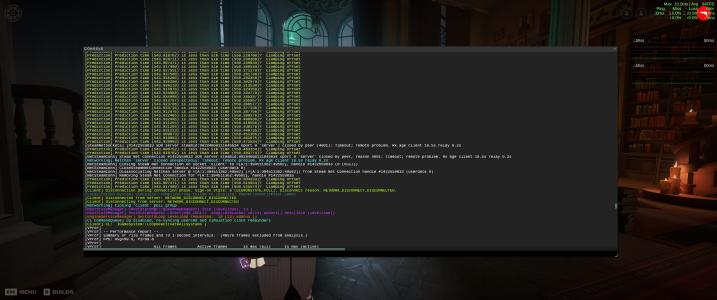
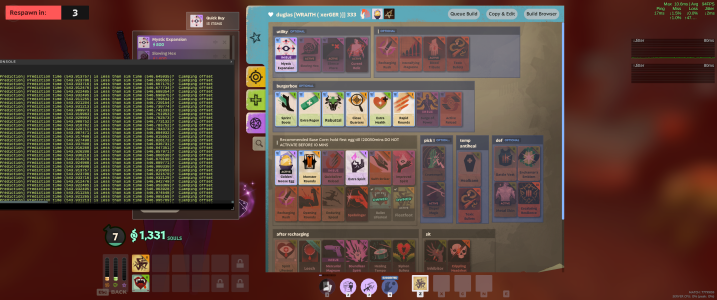
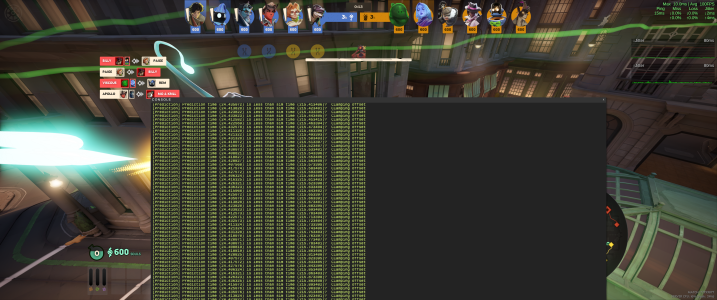
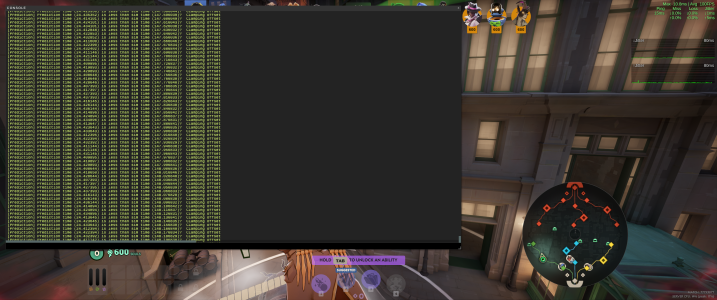
Had the thought to see what the console shows when the issue is happening. Popped into some bot games and waited about 90 seconds.

Seems that whenever the thing is happening for me, there's just HUNDREDS OF THESE being thrown out PER SECOND.

"Prediction time ([value]) is less than sim time ([value])? Clamping offset."

If I had to guess, a program sending out hundreds of thousands of function calls within a minute or two might be a little difficult for folks' machines to keep up with.

Can anybody replicate this?

Also, the one where I was playing Pocket was especially weird because I froze up on the zipline, but pocket was still getting visible, animated debuff affects tied to him, and the kill feed was updating as normal, but I was stuck in place and all the upper UI stayed the same.
 

Attachments

  • Screenshot From 2026-04-23 09-44-08.png
    Screenshot From 2026-04-23 09-44-08.png
    2 MB · Views: 3
  • Screenshot From 2026-04-23 09-43-39.png
    Screenshot From 2026-04-23 09-43-39.png
    2.9 MB · Views: 4
  • Screenshot From 2026-04-23 09-30-07.png
    Screenshot From 2026-04-23 09-30-07.png
    3.4 MB · Views: 4
  • Screenshot From 2026-04-23 09-28-59.png
    Screenshot From 2026-04-23 09-28-59.png
    2.9 MB · Views: 4
Had the thought to see what the console shows when the issue is happening. Popped into some bot games and waited about 90 seconds.

Seems that whenever the thing is happening for me, there's just HUNDREDS OF THESE being thrown out PER SECOND.

"Prediction time ([value]) is less than sim time ([value])? Clamping offset."

If I had to guess, a program sending out hundreds of thousands of function calls within a minute or two might be a little difficult for folks' machines to keep up with.

Can anybody replicate this?

Also, the one where I was playing Pocket was especially weird because I froze up on the zipline, but pocket was still getting visible, animated debuff affects tied to him, and the kill feed was updating as normal, but I was stuck in place and all the upper UI stayed the same.
I just played a full bot match trying to recreate this and had no crash at all after the new update just came out a couple minutes ago. Gonna try to play a full 4v4 match with a friend to see if it works.

Update 1: Crashed during the full 4v4 but noticed my video settings got reset to high and ultra so im running it again to see if low/medium settings fix problem on my end.

Update 2: I crashed even faster when back to my lower video settings. im stumped tbh
 
Last edited:
actually yes, i have my fps capped at 120

upd: the crashes did stop after i switched to proton-ge
Wtfffff I literally didn't worry about the crashing on proton-ge for like a month, before it just stopped working again. This has been happening while on Proton-GE-RTSP this time
😭


I just played a full bot match trying to recreate this and had no crash at all after the new update just came out a couple minutes ago. Gonna try to play a full 4v4 match with a friend to see if it works.

Update 1: Crashed during the full 4v4 but noticed my video settings got reset to high and ultra so im running it again to see if low/medium settings fix problem on my end.

Update 2: I crashed even faster when back to my lower video settings. im stumped tbh
If it's crashing consistently, try pressing f7 to bring up the console when the crashing starts. I wanna see if other folks are also getting the predicition time simulation time bomb like this.
 
I may have found a fix to this. I updated my BIOS for my MSI motherboard. Seems it shipped new with an old BIOS that doesn't read RAM properly. After the updated BIOS, have been running smoothly so far. Something to think about...
 
I may have found a fix to this. I updated my BIOS for my MSI motherboard. Seems it shipped new with an old BIOS that doesn't read RAM properly. After the updated BIOS, have been running smoothly so far. Something to think about...
Just updated my BIOS (asus) a few days ago to rule this out. 64 gig ram, ddr5, 6000 ghz, running at stock settings.
 
Back
Top