
dicartalexe
New member
First, add a crosshair preview in the settings, like in CS2. Right now it’s very inconvenient to adjust it since you have to leave the menu and come back every time. Yes, you can configure the crosshair through the console, but not many players know how to use it or which commands to enter.
Second, add a “dot width” setting. Sometimes you want the dot to be slightly larger than the default. And about the dot itself fix that gap between the dot and the outline. It’s really noticeable and looks uncomfortable.
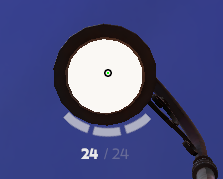
Third, fix the “Show Pip Border” option. It doesn’t work at all.
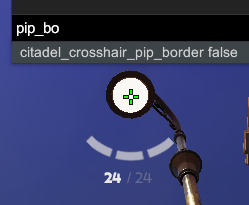
Now the crosshair bugs I found:
View attachment Deadlock 2025.11.26 - 01.16.51.04.mp4
When you change the crosshair width to values 1–3, the crosshair becomes glitchy. And it’s not only at those values: 4 looks normal, 5 glitches again, 6 is normal, 7 glitches again, and so on. The same issue exists with the “height” parameter. At certain values the same problem appears.
Second, add a “dot width” setting. Sometimes you want the dot to be slightly larger than the default. And about the dot itself fix that gap between the dot and the outline. It’s really noticeable and looks uncomfortable.
Third, fix the “Show Pip Border” option. It doesn’t work at all.
Now the crosshair bugs I found:
View attachment Deadlock 2025.11.26 - 01.16.51.04.mp4
When you change the crosshair width to values 1–3, the crosshair becomes glitchy. And it’s not only at those values: 4 looks normal, 5 glitches again, 6 is normal, 7 glitches again, and so on. The same issue exists with the “height” parameter. At certain values the same problem appears.

