
navneet1729
New member
Not sure if this is intended behaviour or a bug, so posting here to sanity check.
This occurs in the menus (before entering a match), not during live gameplay.
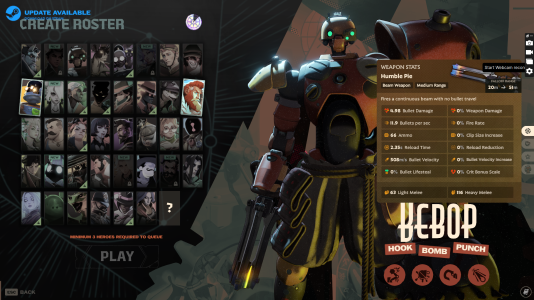
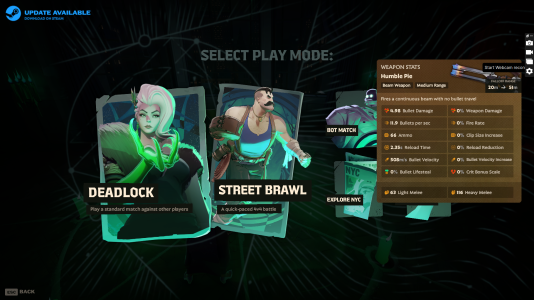
When opening an operator’s ability / weapon info panel and then transitioning to the Play Mode selection, the info panel sometimes remains on screen and blocks part of the UI.
I initially thought it might be intentional, but I wasn’t able to dismiss it:
This made it hard to see and interact with the underlying menu.
Has anyone else encountered this, or is there a known way to dismiss the panel that I’m missing?
View attachment 1st bug (minnor).mp4
Screenshot attached.
This occurs in the menus (before entering a match), not during live gameplay.
When opening an operator’s ability / weapon info panel and then transitioning to the Play Mode selection, the info panel sometimes remains on screen and blocks part of the UI.
I initially thought it might be intentional, but I wasn’t able to dismiss it:
- ESC didn’t close it
- Clicking outside didn’t close it
- Transitioning screens didn’t clear it
This made it hard to see and interact with the underlying menu.
Has anyone else encountered this, or is there a known way to dismiss the panel that I’m missing?
View attachment 1st bug (minnor).mp4
Screenshot attached.
Last edited:


