

Processing.username
New member
Me and my boyfriend tried to play earlier today and for some reason the game wasn't allowing him to queue and kept coming up with a pop up saying "Cannot enter matchmaking, you are already in a game please leave the game first." We hadn't played the game since yesterday. So we tried a couple of fixes such as
1. Restarting the game
2. Restarting his PC
3. Restarting Steam
4. Verified files
5. Used 'Disconnect' console command
6. Used 'citadel_hideout_stop_matchmaking' console command
7. Used 'Map' console commands and tried pressing the leave game from the maps.
8. Tried sandbox mode then tried leaving sandbox mode.
9. Tried Joining a group and leaving a group.
10. Even switched computers to see if it was a problem with his computer.
(I can queue into deadlock just fine from my account and play bot matches and tutorial matches and everything, but when I log into his account and try to play bot matches or tutorial matches the pop up still happens.)
Pretty much I have tried everything I could possibly think of as a solution to this problem and nothing seemed to work and everything I looked up I haven't seen a solution to this issue. We even gave it 5 to 6 hours to wait to see if time would fix it and still nothing.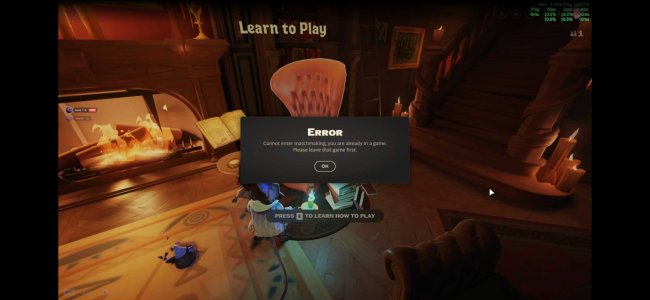
1. Restarting the game
2. Restarting his PC
3. Restarting Steam
4. Verified files
5. Used 'Disconnect' console command
6. Used 'citadel_hideout_stop_matchmaking' console command
7. Used 'Map' console commands and tried pressing the leave game from the maps.
8. Tried sandbox mode then tried leaving sandbox mode.
9. Tried Joining a group and leaving a group.
10. Even switched computers to see if it was a problem with his computer.
(I can queue into deadlock just fine from my account and play bot matches and tutorial matches and everything, but when I log into his account and try to play bot matches or tutorial matches the pop up still happens.)
Pretty much I have tried everything I could possibly think of as a solution to this problem and nothing seemed to work and everything I looked up I haven't seen a solution to this issue. We even gave it 5 to 6 hours to wait to see if time would fix it and still nothing.


