Poor performance and FPS drops

azetyazety

New member
My game is getting serious fps drops most of the time, to the point where i average 22fps and, at some points, multiple seconds of none at all.

I thought this was a problem with my specs but my PC can handle other modern games great (avg 100fps on bo7, gta5, etc.) but when it comes to deadlock it seems to just curl up and die. I also have deadlock on low settings with maybe 1 or 2 settings on medium.

It might be because of how the models for the map load in when you look away and then at them? I'm unsure on the cause but it does get a little annoying for tense fights.
Video just shows what I mean.

Specs: Ryden 5 3600, 2x8gb, 4gb Radeon RX 6500xt
View attachment MedalTVDeadlock20260214142351943.mp4
 
Try a gameinfo.gi config file from gamebanana. There is tons of content for Deadlock there, but what you need is a comp fps file from there. You simply replace it witht he gameinfo file in your deadlock folder inside the citadel folder. Save the current gameinfo.gi file you have just in case (just incase) and drop the new one in there. Follow the instructions depending on who you choose from. But its very quick. Also, if you havent already try running the game with some launch options like preloading shaders etc. The game will take a second to load once you get tot he hideout but it will help. For a specific one try optimization lock or dysons comp fps settings.

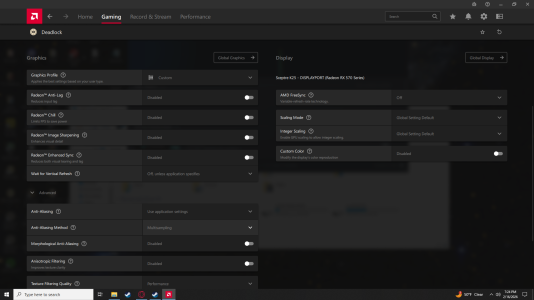
Another thing is press alt+r to open adrenalin and make sure you put these setting on. While it seems counterintuitive to turn off a lot of the settings, it generally doesn't help with this game in particular for whatever reason. You can mess with it some if you wish, maybe your comp will act differently but a lot of what I researched led me to this. You can also delete the shader cache too, but that will need to fill up again after you delete it so expect some minor stuttering when you play again as its loading and storing them.

Lastly if I have Razer stuff so it comes with a free game booster that turns off unimportant processes while I game. Highly recommend something of the sort. If you dont have razer try process lasso, its free. You can follow piggy's guide on how to set that up specifically for deadlock. I highly encourage you to do this.

In windows, there are processes that hinder your performance aswell. You can look it up to turn off some process slowing your comp down. (Don't do this blindly, some functions are important to your comp and can mess things up. Just follow a video on that its really not hard and doesnt take long.

Lastly, make sure the game is installed in your ssd (if you have one) as it will load/run better.

But yeah thats all I can think of... I have a crappy comp and have a ton of hours on this game since its so much fun. Ive done a ton of research on getting this game to run better lol but its still not the best.

Ryzen 7 2700
RX570 8GB
16GB Ram
Windows 10
 

Attachments

  • Screenshot (1).png
    Screenshot (1).png
    340.3 KB · Views: 9
  • Screenshot (2).png
    Screenshot (2).png
    313.9 KB · Views: 9
Try a gameinfo.gi config file from gamebanana. There is tons of content for Deadlock there, but what you need is a comp fps file from there. You simply replace it witht he gameinfo file in your deadlock folder inside the citadel folder. Save the current gameinfo.gi file you have just in case (just incase) and drop the new one in there. Follow the instructions depending on who you choose from. But its very quick. Also, if you havent already try running the game with some launch options like preloading shaders etc. The game will take a second to load once you get tot he hideout but it will help. For a specific one try optimization lock or dysons comp fps settings.

Another thing is press alt+r to open adrenalin and make sure you put these setting on. While it seems counterintuitive to turn off a lot of the settings, it generally doesn't help with this game in particular for whatever reason. You can mess with it some if you wish, maybe your comp will act differently but a lot of what I researched led me to this. You can also delete the shader cache too, but that will need to fill up again after you delete it so expect some minor stuttering when you play again as its loading and storing them.

Lastly if I have Razer stuff so it comes with a free game booster that turns off unimportant processes while I game. Highly recommend something of the sort. If you dont have razer try process lasso, its free. You can follow piggy's guide on how to set that up specifically for deadlock. I highly encourage you to do this.

In windows, there are processes that hinder your performance aswell. You can look it up to turn off some process slowing your comp down. (Don't do this blindly, some functions are important to your comp and can mess things up. Just follow a video on that its really not hard and doesnt take long.

Lastly, make sure the game is installed in your ssd (if you have one) as it will load/run better.

But yeah thats all I can think of... I have a crappy comp and have a ton of hours on this game since its so much fun. Ive done a ton of research on getting this game to run better lol but its still not the best.

Ryzen 7 2700
RX570 8GB
16GB Ram
Windows 10
I tried the optimization lock and it would definitely help in the long run, but i'm still having the problem with massive stutters and under performing.

Pre your reply I already had adrenalin fully optimized, as well as on an ssd with windows optimized also.

All thats left now is to hope for a stability update I suppose.
 
Try a gameinfo.gi config file from gamebanana. There is tons of content for Deadlock there, but what you need is a comp fps file from there. You simply replace it witht he gameinfo file in your deadlock folder inside the citadel folder. Save the current gameinfo.gi file you have just in case (just incase) and drop the new one in there. Follow the instructions depending on who you choose from. But its very quick. Also, if you havent already try running the game with some launch options like preloading shaders etc. The game will take a second to load once you get tot he hideout but it will help. For a specific one try optimization lock or dysons comp fps settings.

Another thing is press alt+r to open adrenalin and make sure you put these setting on. While it seems counterintuitive to turn off a lot of the settings, it generally doesn't help with this game in particular for whatever reason. You can mess with it some if you wish, maybe your comp will act differently but a lot of what I researched led me to this. You can also delete the shader cache too, but that will need to fill up again after you delete it so expect some minor stuttering when you play again as its loading and storing them.

Lastly if I have Razer stuff so it comes with a free game booster that turns off unimportant processes while I game. Highly recommend something of the sort. If you dont have razer try process lasso, its free. You can follow piggy's guide on how to set that up specifically for deadlock. I highly encourage you to do this.

In windows, there are processes that hinder your performance aswell. You can look it up to turn off some process slowing your comp down. (Don't do this blindly, some functions are important to your comp and can mess things up. Just follow a video on that its really not hard and doesnt take long.

Lastly, make sure the game is installed in your ssd (if you have one) as it will load/run better.

But yeah thats all I can think of... I have a crappy comp and have a ton of hours on this game since its so much fun. Ive done a ton of research on getting this game to run better lol but its still not the best.

Ryzen 7 2700
RX570 8GB
16GB Ram
Windows 10
Thanks for sharing.

Do you have clear info on gameinfo.gi config actually not being bannable? Usually game devs strictly forbid scripting and stuff.

As for Adrenaline software - while having issues with Valorant and Apex legends I have contacted AMD support many times and they finally gave me clear info on software "advance" section = as per AMD it is ONLY for older games like DX9/10 AND these settings even if turned on DO NOT affect new games.

So they recommended to keep them "off" or "use application setting" not to create a mess.
If you have clear benchmark results on things improving, please share, will forward them to AMD as to be fair at times I am getting a feeling they are not keeping up especially with competitive gaming community that needs max AND stable fps.
 
My game is getting serious fps drops most of the time, to the point where i average 22fps and, at some points, multiple seconds of none at all.

I thought this was a problem with my specs but my PC can handle other modern games great (avg 100fps on bo7, gta5, etc.) but when it comes to deadlock it seems to just curl up and die. I also have deadlock on low settings with maybe 1 or 2 settings on medium.

It might be because of how the models for the map load in when you look away and then at them? I'm unsure on the cause but it does get a little annoying for tense fights.
Video just shows what I mean.

Specs: Ryden 5 3600, 2x8gb, 4gb Radeon RX 6500xt
View attachment 84235
You should probably start with running Adrenaline software game overlay and log CPU/GPU/RAM utilization and other related metrics to see what's the issue.

For me game changer in many games were process lasso and trick where you disable core 0(and 1 depending on CPU) = ones that usually default to system stuff -> so game basically runs only on other cores.

Instantly fixed FPS issues for me in Apex legends and improved situation in Valorant and other games. Now I just do that for every new game I play by default.
 
Thanks for sharing.

Do you have clear info on gameinfo.gi config actually not being bannable? Usually game devs strictly forbid scripting and stuff.

As for Adrenaline software - while having issues with Valorant and Apex legends I have contacted AMD support many times and they finally gave me clear info on software "advance" section = as per AMD it is ONLY for older games like DX9/10 AND these settings even if turned on DO NOT affect new games.

So they recommended to keep them "off" or "use application setting" not to create a mess.
If you have clear benchmark results on things improving, please share, will forward them to AMD as to be fair at times I am getting a feeling they are not keeping up especially with competitive gaming community that needs max AND stable fps.
Changing the gameinfo.gi isnt "scripting" or anything like that. All you are doing is changing values and/or adding lines of code that implement certain things to the graphics. Such as reducing the amount of particles being rendered at any given time to the resolution size of the screen. The only credentials I can give is the countless videos online demonstrating this including the youtuber piggy. Its not bannable as far as I am aware given high level players using it and people with bad computers (including me). Once the game is fully released I am sure they will optimize it for mid-high end pcs. The next best thing is configuring that particular file and the video file!

Anyway, I'll look into the disabling core 0, sounds promising.
 
I tried the optimization lock and it would definitely help in the long run, but i'm still having the problem with massive stutters and under performing.

Pre your reply I already had adrenalin fully optimized, as well as on an ssd with windows optimized also.

All thats left now is to hope for a stability update I suppose.
The only other thing I can think is capping your fps to your monitors refresh rate or 1 fps lower than that. I hear that it is usually due to fps jumps so trying to cap it or lower it to what feel appropriate to you might help.
 
Back
Top