persistent UI bug

spacee

New member
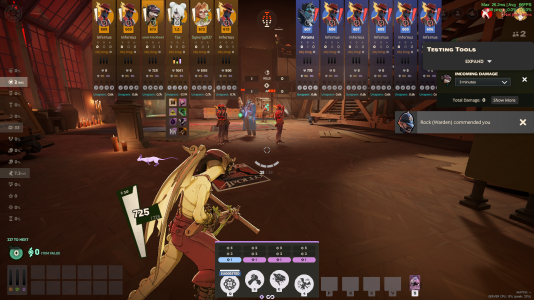
there's an issue with the ui where it will sometimes become stuck on screen fully expanded like this after you die or open shop sometimes. (i know i have a ui mod in this pic but many of my friends without it have experienced the same thing)
 

Attachments

  • fgbxd.png
    fgbxd.png
    2.2 MB · Views: 5
YES, BUMP!!
This happened to me and was very very annoying, bordering on unplayable. When I restarted to attempt to fix it and rejoined street brawl, I was not able to pick my items and therefore NOT ABLE TO MAKE ANY INPUTS AT ALL. (making the game actually unplayable lol)

After closing out Deadlock and re-connecting, the only thing buggy was that I had no crosshair for the rest game, which I honestly settled on not re-connecting for.

It's not just a bug regarding persistent ui, but also some elements of the UI disappearing and not functioning entirely.

This is seriously frustrating and has already happened to my wife several times, who plays on an entirely different computer.

I'm not sure if anyone is able to consistently reproduce this, but I think it involves pressing TAB with bad timing.

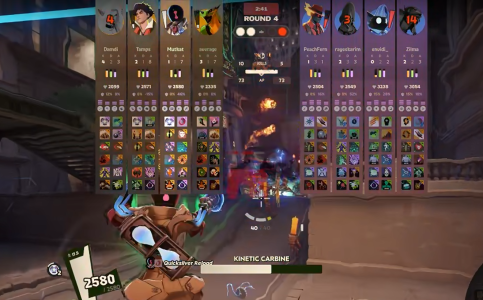
I've attached a clip of the bug below.

Obligatory, "Valve pls fix."
 

Attachments

A friend of mine is also experiencing this.
The "hero info" UI is stuck like this.
Tried disconnecting, tabbing, nothing
A restart should fix this but it's annoying
1770291932417.png
 
I found out why this was happening and how to fix it.

Here is how to replicate the bug:
  1. Open chat
  2. Open scoreboard
  3. Close the chat while the scoreboard is open
To fix it:
  1. Open chat
  2. Open and close (toggle) the scoreboard (at this point the scoreboard should close)
  3. Close chat

So far this is the only fix I found besides restarting the entire game. Connect/Disconnect doesn't fix it.
 
Another thing that can cause this is the following:
Enter the "ESC" menu
Press and hold the TAB key
While holding the TAB key, press ESC

The UI will be stuck.

The current workaround I found is simply tapping the TAB key while in the ESC menu.
 
Another thing that can cause this is the following:
Enter the "ESC" menu
Press and hold the TAB key
While holding the TAB key, press ESC

The UI will be stuck.

The current workaround I found is simply tapping the TAB key while in the ESC menu.
This appears to be fixed as of the latest patch.
 
Back
Top